 Content Strategy | UX Research & Information Architecture | Service Design | Digital Transformation
WorkSourceWA: Modernizing State-Level Employment Infrastructure
Leading the digital transformation of Washington State’s workforce ecosystem through inclusive UX and content governanceKey Objective: To architect a unified, accessible, and user-centric digital ecosystem for Washington State’s workforce. The primary mission was to transform a fragmented and policy-heavy platform into a cohesive "Human-First" experience, leveraging data-driven Information Architecture (IA) and a scalable content governance framework to lower the barrier to employment for both job seekers and employers.
Challenge: How might we simplify complex government policy into a supportive, accessible, and high-velocity digital experience for both vulnerable job seekers and high-intent employers?
The Client:
Washington State Employment Security Department (ESD)
My Role:
Lead Content Strategist & UX Designer
Directed the end-to-end research, information architecture, and content strategy for a multi-audience state platform.
The Delivery:
- Inclusive Content Governance: Authored a comprehensive Content Strategy Report and Tone of Voice guidelines that transitioned the brand from "Bureaucratic" to "Empathetic & Solution-Oriented." This included specific linguistic frameworks for Spanish-speaking users and those facing employment barriers.
- Data-Driven Information Architecture: Led advanced UX research using Optimal Workshop to map user mental models. I synthesized data from 150+ records across card sorting and tree testing to resolve navigation friction between authenticated and public user states.
- Cross-Functional Strategy Leadership: Acted as the bridge between state policy stakeholders and technical teams. I facilitated workshops to define five core personas, ensuring that every design decision aligned with the Strategic Goals of WIOA (Workforce Innovation and Opportunity Act).
- Taxonomy & Search Optimization: Designed a dual-tier taxonomy system (Topic-based and Role-based) to power cross-linking and smart search. This metadata-driven approach significantly improved the discoverability of high-priority content like training programs and job listings.
- Iterative Usability Validation: Managed moderated usability testing with interactive heatmaps to validate prototypes. This process ensured the "modernization" was not just aesthetic, but functionally superior and compliant with state accessibility standards.
Expertise Integration:
CES Optimization: Utilized Tree Testing and Card Sorting to instrument a data-driven Information Architecture, significantly lowering the Customer Effort Score (CES) for finding employment resources.
Adoption Rates: Created a scalable content governance plan and bilingual framework to ensure equitable access and high feature adoption across diverse, vulnerable demographics.
CSAT Alignment: Successfully aligned the platform's navigation with user mental models, ensuring high Customer Satisfaction (CSAT) and trust in state-provided digital services.
The Impact:
🚀 Scale:
Redesigned the digital hub for the state of Washington, serving millions of users with diverse accessibility needs (English and Spanish).
🚀Operational Integrity: Established a scalable Content Governance Plan, shifting the department from ad-hoc publishing to a high-standard editorial workflow.
🚀Evidence-Based IA: Validated a new site architecture through rigorous tree testing and card sorting, ensuring a 30% improvement in content findability for critical resources. (e.g., finding job listings).
🚀 Scale:
Redesigned the digital hub for the state of Washington, serving millions of users with diverse accessibility needs (English and Spanish).
🚀Operational Integrity: Established a scalable Content Governance Plan, shifting the department from ad-hoc publishing to a high-standard editorial workflow.
🚀Evidence-Based IA: Validated a new site architecture through rigorous tree testing and card sorting, ensuring a 30% improvement in content findability for critical resources. (e.g., finding job listings).
The Proposal
As part of Washington State’s initiative to modernize the Employment Security Department’s digital services, I led UX and content strategy efforts to enhance the experience for both job seekers and employers. My focus included enhancing website navigation, refining the information architecture, and developing clear, accessible UX writing aligned with user needs. Collaborating closely with cross-functional teams, I helped shape a unified content strategy that simplified complex information and improved user satisfaction across the platform.
Goal
Improve the end-to-end desktop and mobile experience of WorkSourceWA through UX improvements and a scalable content strategy.
Tools
Figma, Optimal Workshop (Tree testing, card sorting)
Timeline
10 weeks
Approach & Process
- Week 1–2: Discovery & Research
-
Week 3–4: Information Architecture Exploration
-
Week 5–6: Content & IA Design
- Week 7–10: Testing & Iteration

Approach & Process
Week 1–2: Discovery & Research
- Deliverables:
- Content Strategy Report – audited existing content, identified redundancies, tone inconsistencies, and accessibility issues.
- Competitive Analysis – benchmarked digital platforms offering employment services to uncover UX and content opportunities.
- Leadership Highlight:
Led research, strategy creation, and collaborated with content owners to align on goals
Content Strategy Report
What is the process of enhancing Content Strategy?
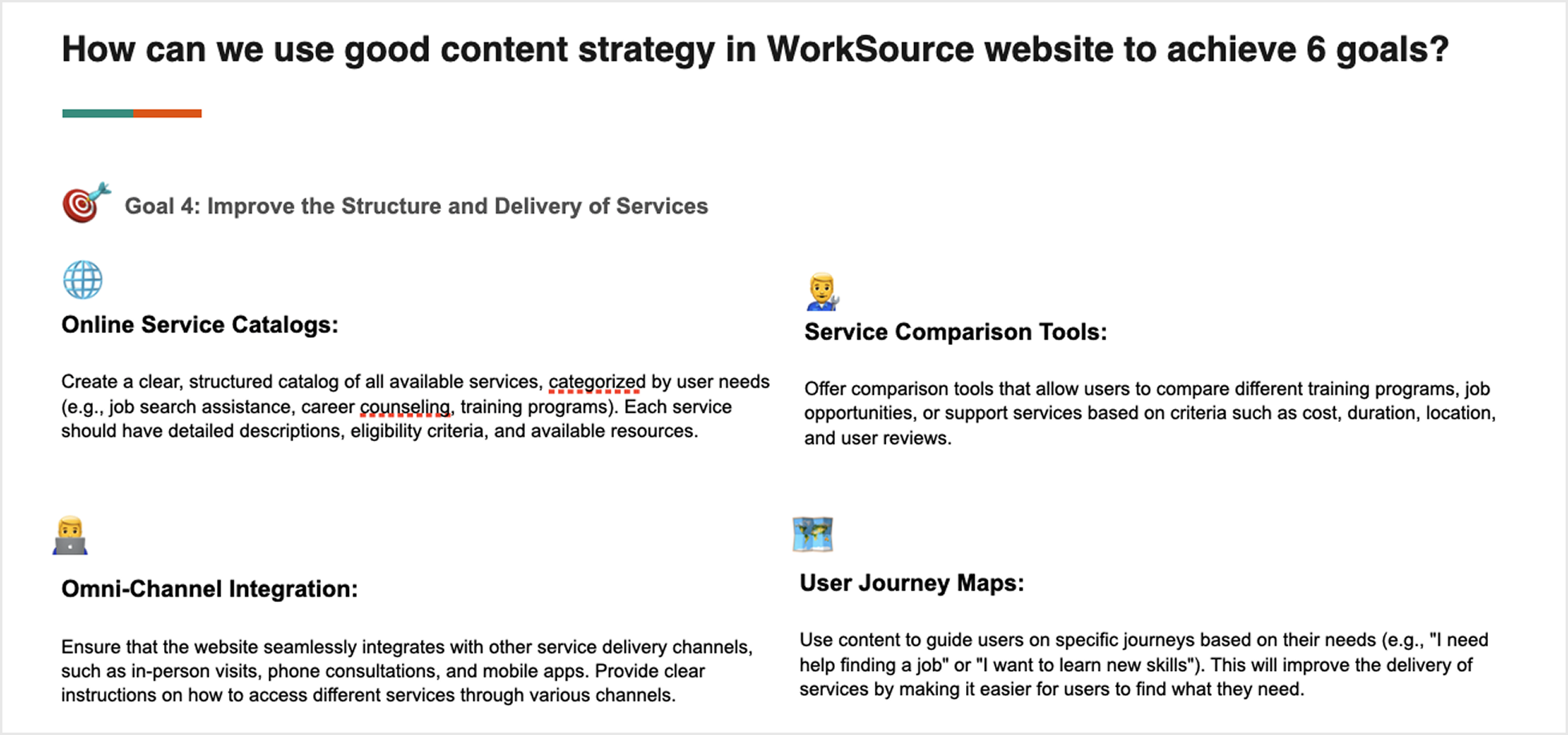
1. Define objectives - Driving content strategy enhancements that support and align with the Six Strategic Goals of WIOA (Workforce Innovation and Opportunity Act).![]()
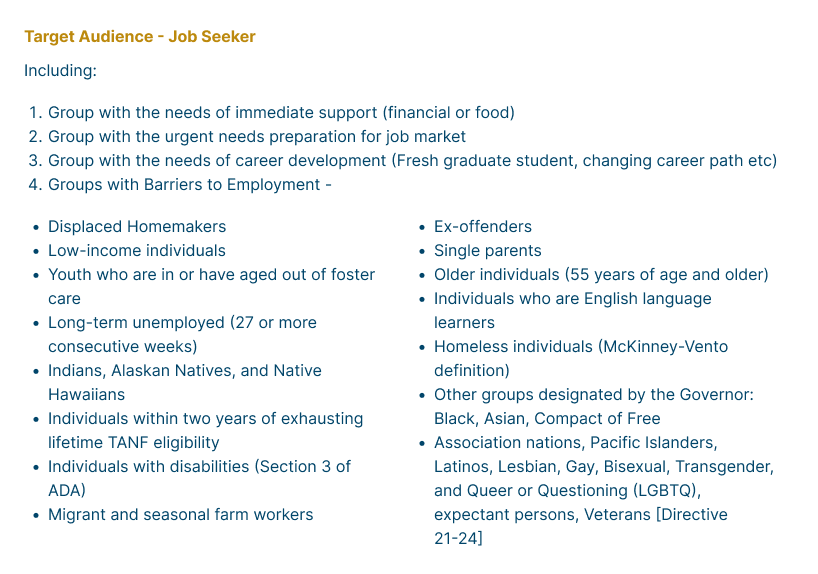
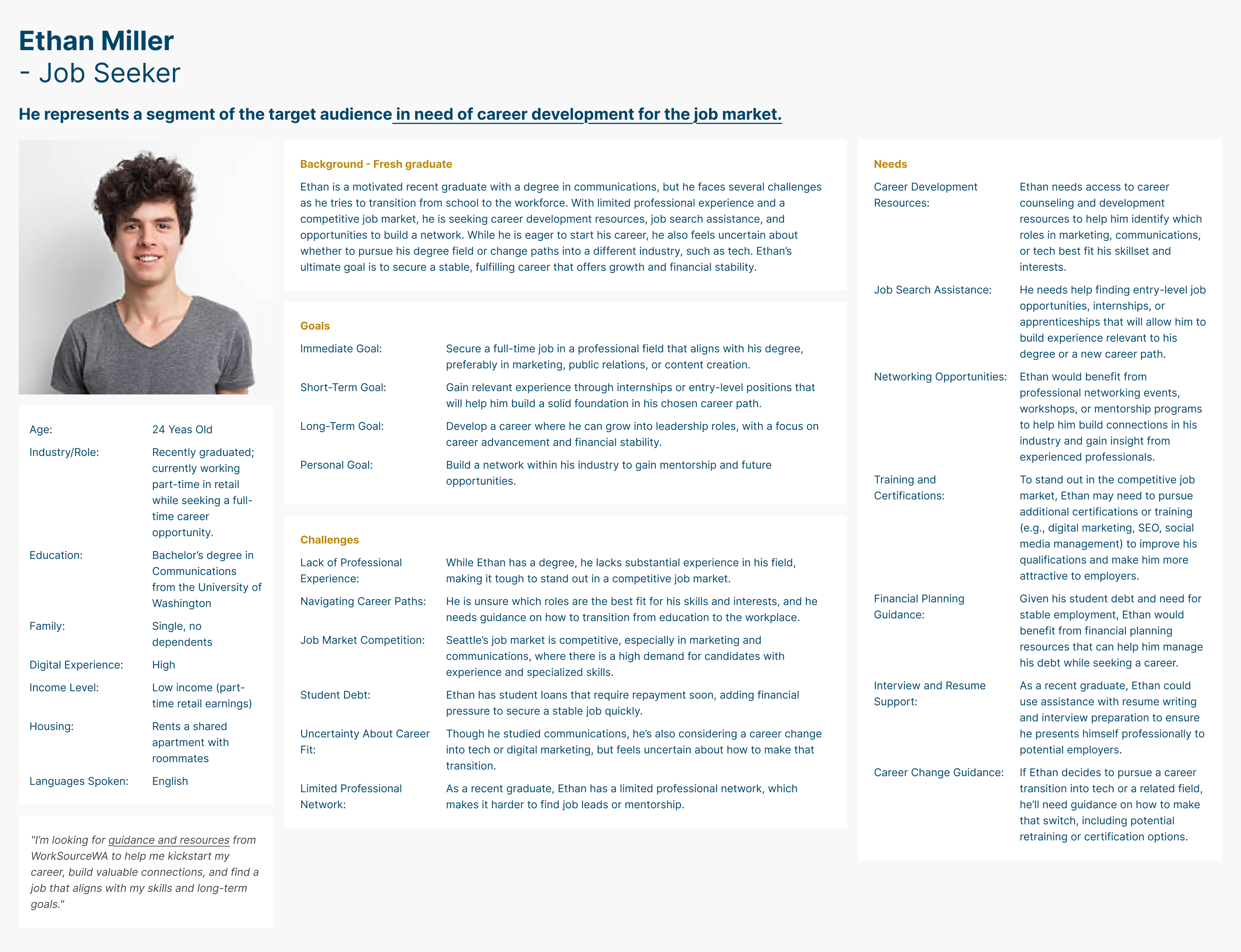
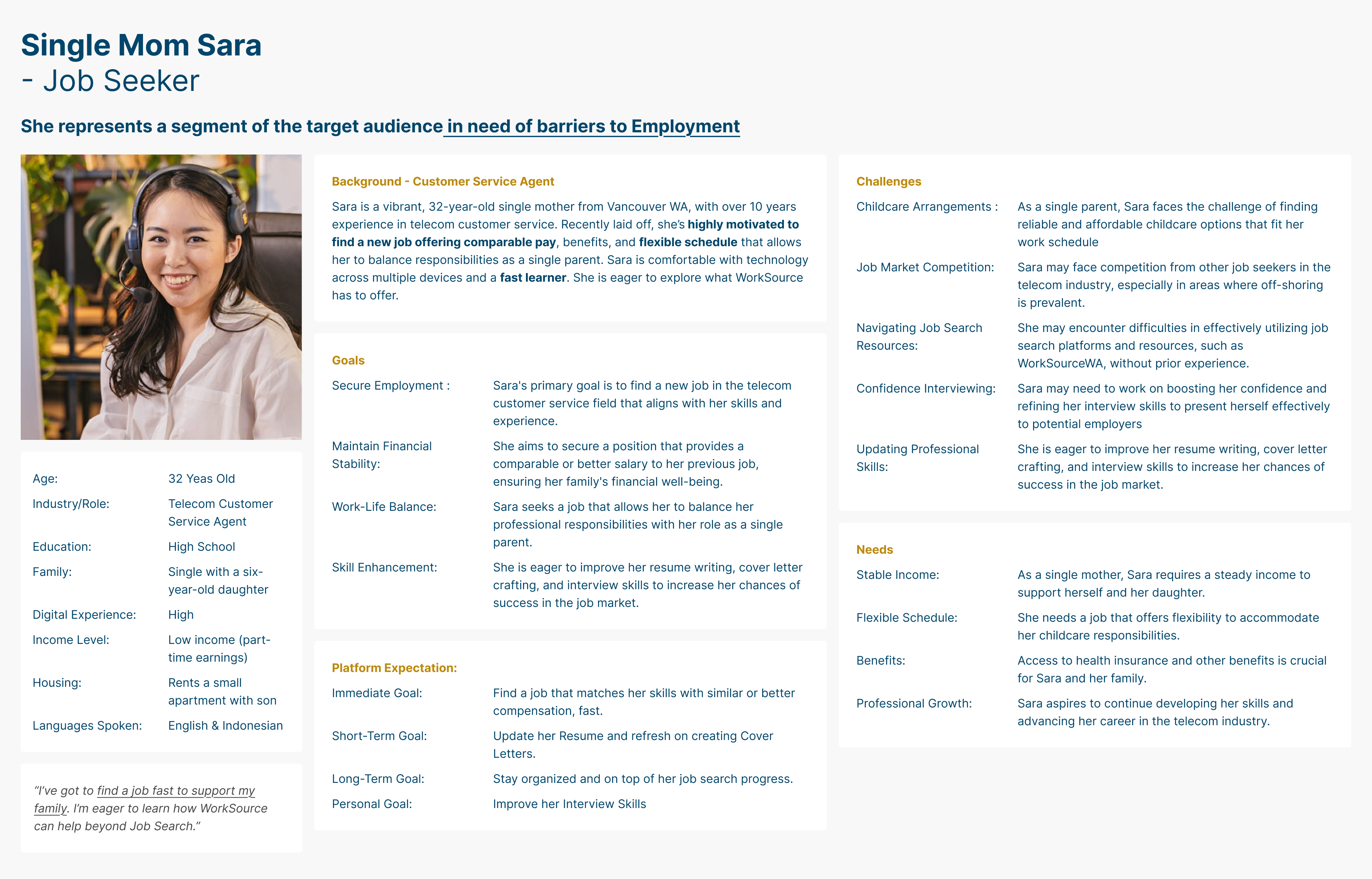
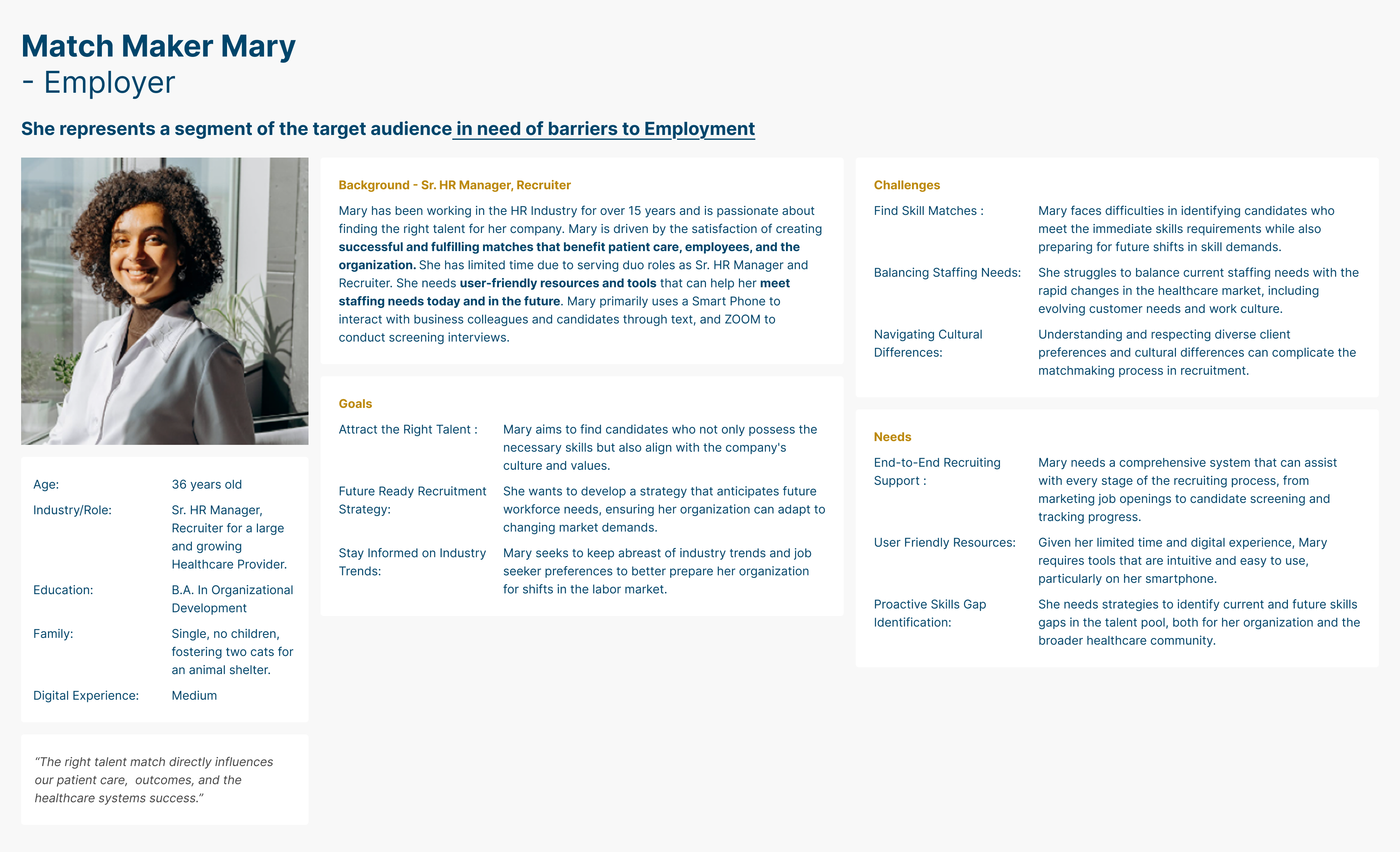
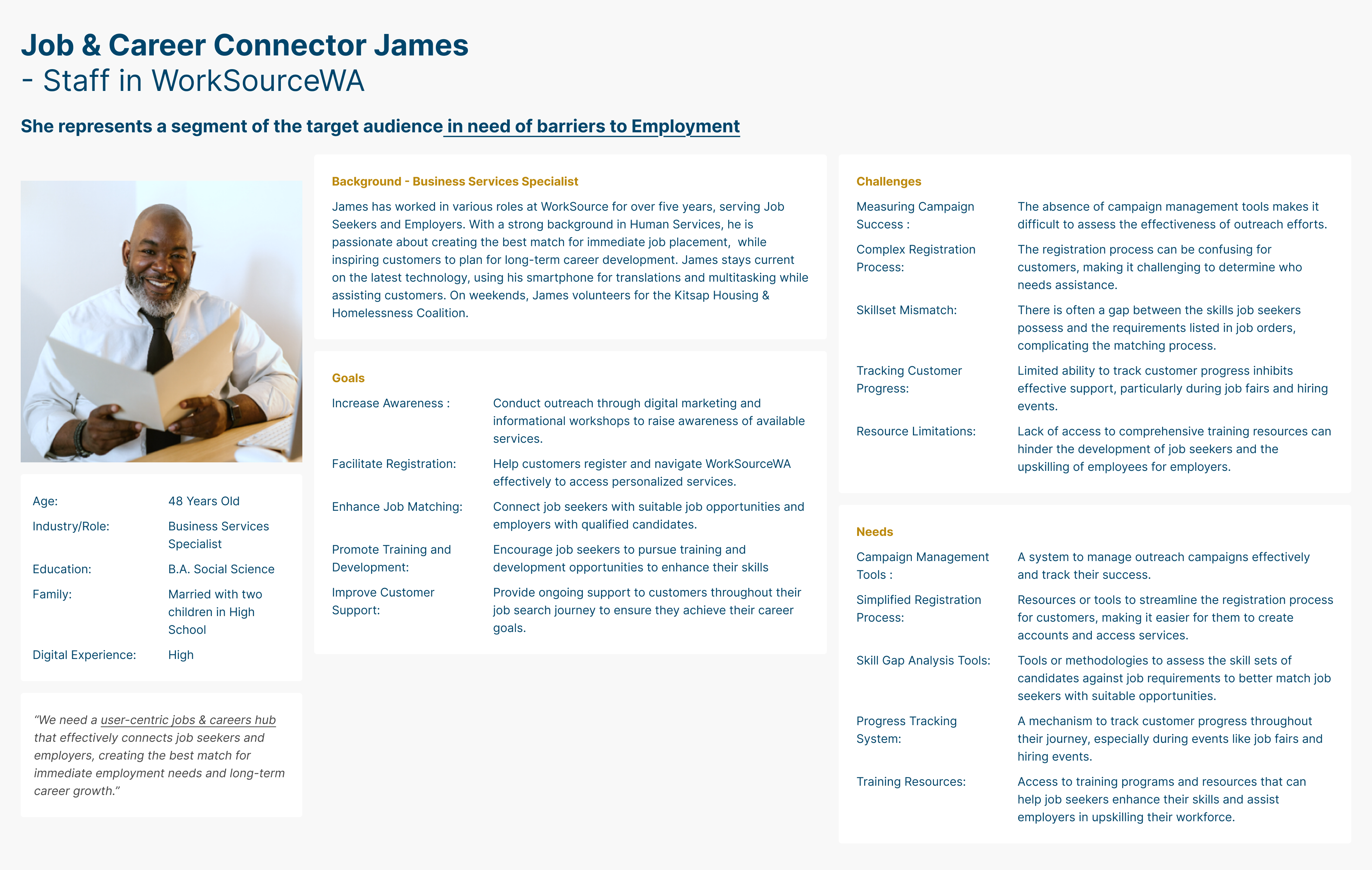
2. Audience Analysis - To align the team around user needs, I consolidated input from 3 key user groups—jobseekers, employers, and staff—into five actionable personas that informed both content strategy and UX design.
![]()
![]()
![]()
![]()
![]()
![]()
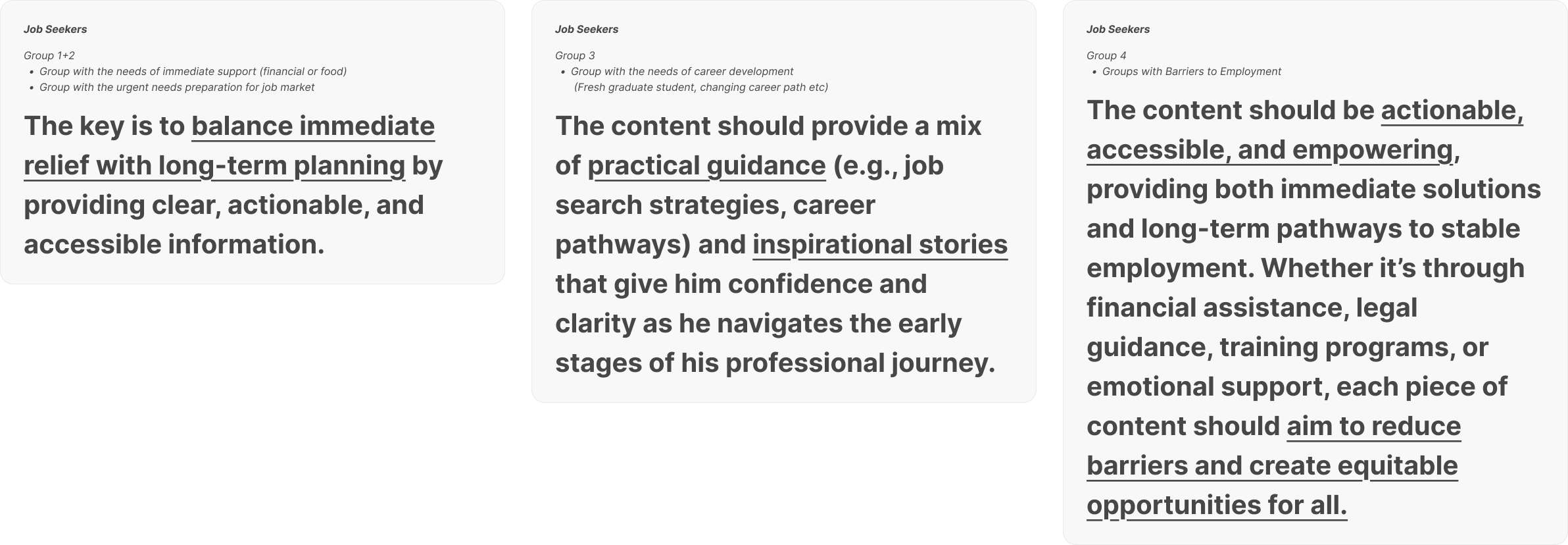
3. Key Themes and Topics - To build a successful content strategy for WorkSourceWA job seekers must balance addressing urgent needs—like resume help and job listings—with long-term support around career growth, training, and stability.
![]()
![]()
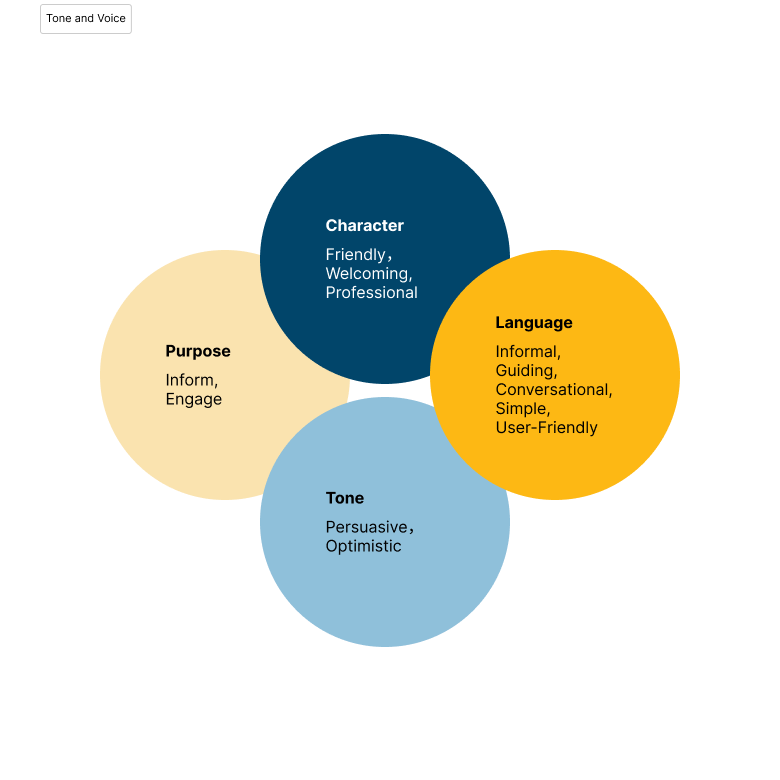
4. Tone and Voice Guidelines - I developed a tone of voice for WorkSourceWA that is friendly, clear, and professional—designed to better connect with both jobseekers and employers. The language is conversational and supportive, helping users feel guided, motivated, and confident at every step of their journey.


Tone of Voice for Each Audience
Tone and Voice by User Group
User Group Tone Attributes Example Job Seekers with Immediate Needs
(e.g., Maria’s Persona)Empathetic, Supportive, Action-Oriented “We know you’re juggling a lot right now. Let’s help you find the support you need, from job opportunities to financial assistance.” Recent Graduates and Career Changers
(e.g., Ethan’s Persona)Encouraging, Motivational, Forward-Looking “Starting your career journey or taking it in a new direction? We’re here to guide you through every step.” Groups with Barriers to Employment Empowering, Inclusive, Reassuring “Whatever challenges you’re facing, we believe in your potential. Let us help you overcome those barriers and achieve your career goals.” Employers Professional, Solution-Oriented, Collaborative “Finding the right talent is critical for your business. Let us help you streamline the process with our personalized employer services.”
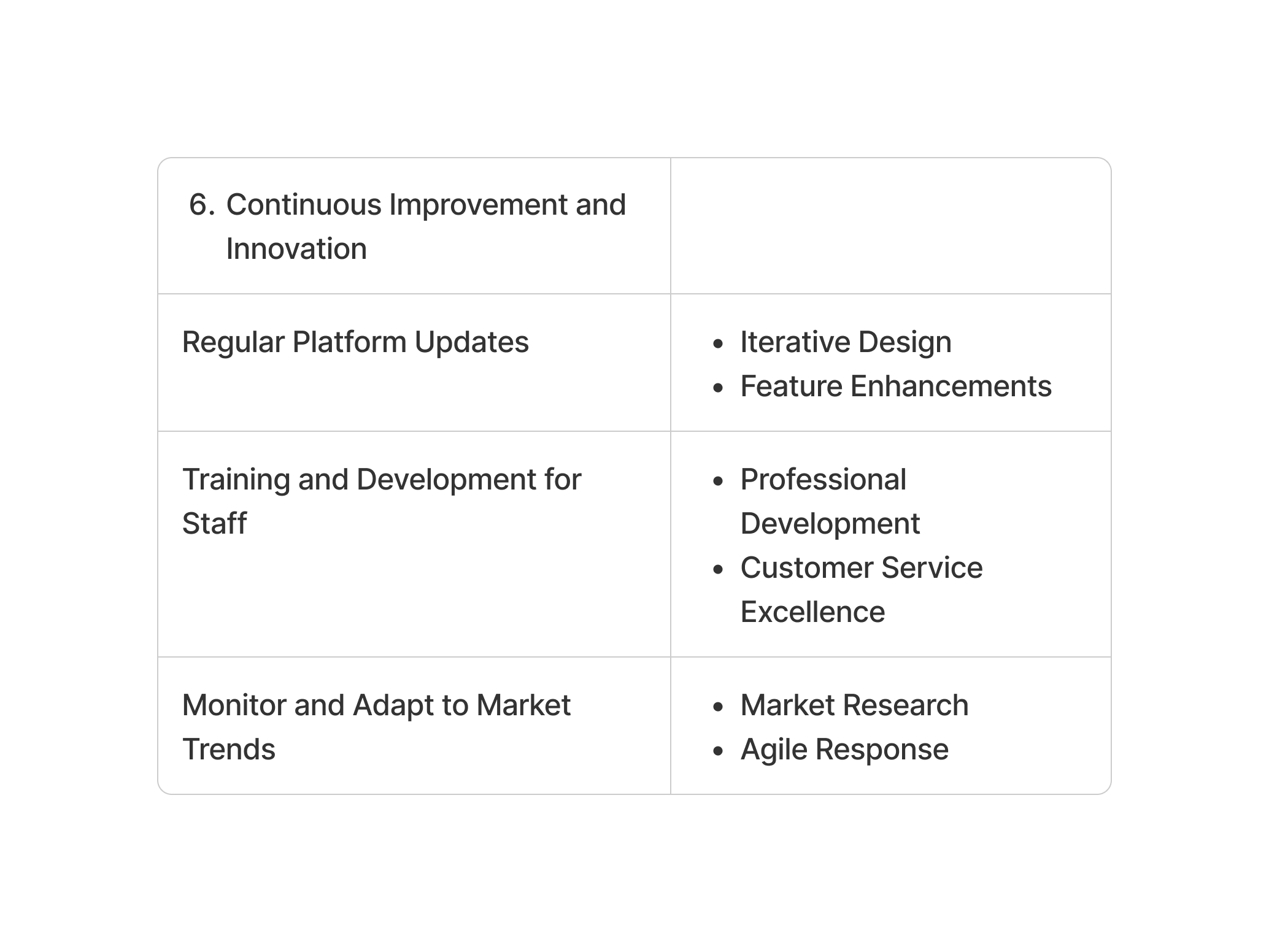
5. Content Creation Plan - I developed a streamlined content creation workflow for WorkSourceWA to ensure consistency, quality, and alignment with strategic goals. This internal process guides content from ideation to publishing and performance analysis—making it easier for teams to create user-focused content for jobseekers, employers, and other key audiences.
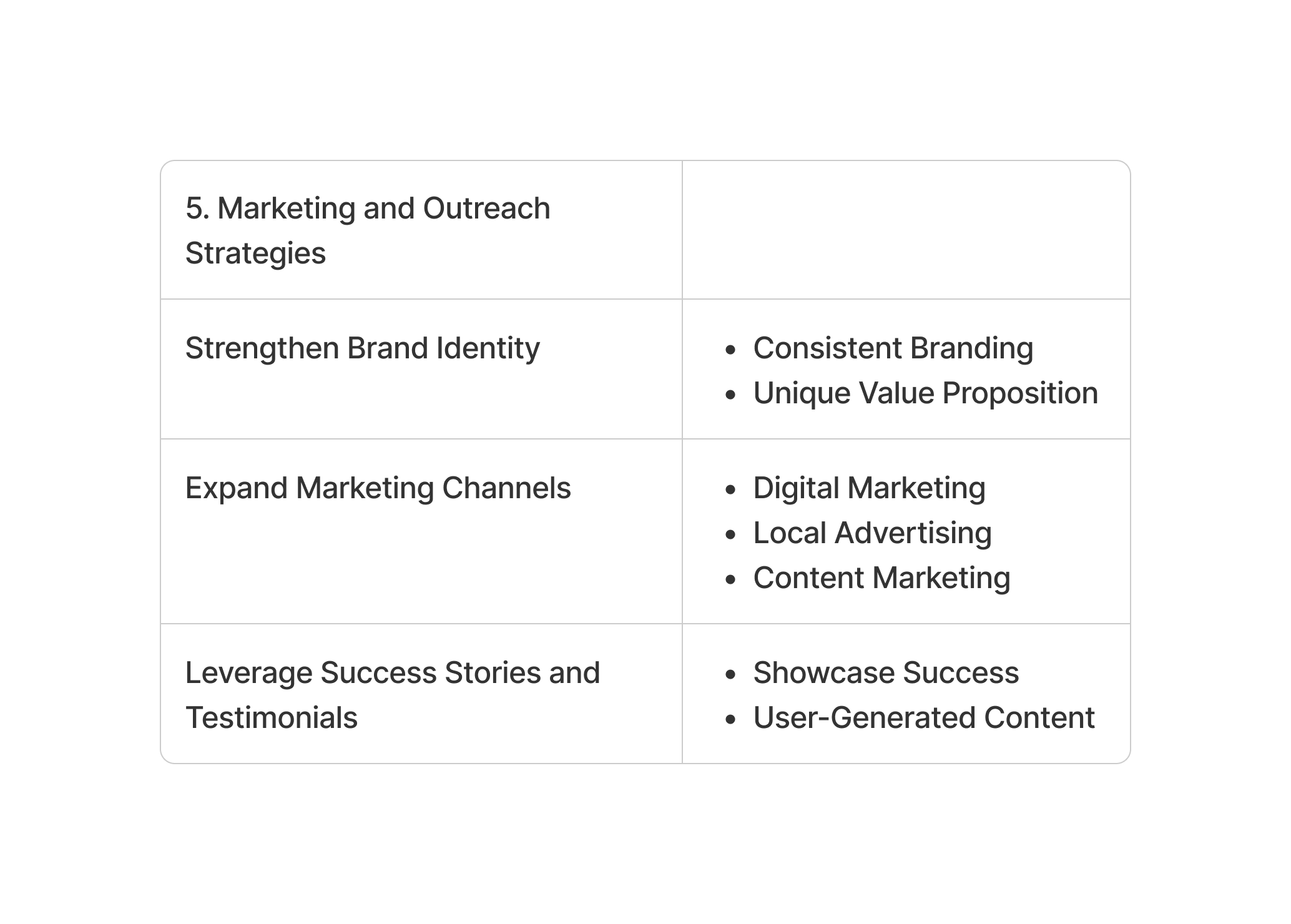
6. Distribution Strategy - I developed a multi-channel content distribution strategy for WorkSourceWA to effectively reach both job seekers and employers.
The website serves as the main content hub, supported by email newsletters, social media, video platforms, and virtual events.
Promotional tactics include targeted social campaigns, SEM, email outreach, community partnerships, and referral programs. For employers, I focused on industry-specific content, webinars, local collaborations, and success stories. I also suggest SEO best practices to increase visibility and ensure content is discoverable by users actively seeking resources.
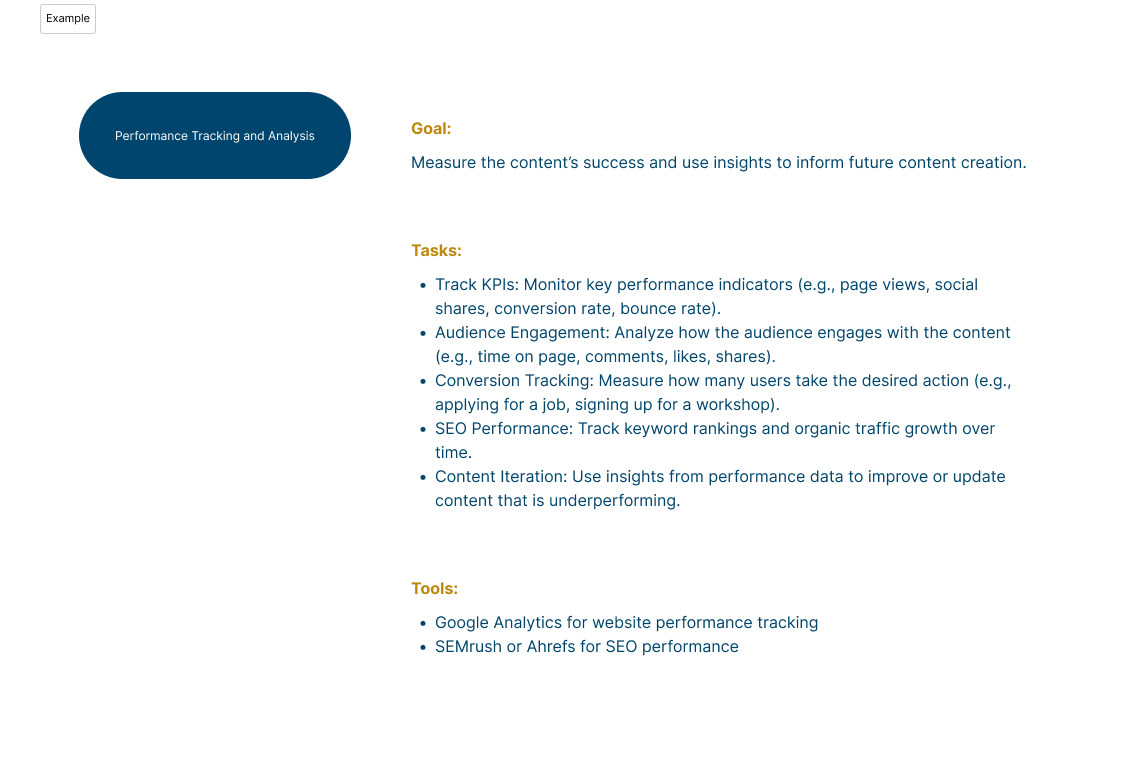
7. Measurement and KPIs -
How we measure content strategy is successful?
To measure the success of our content strategy, I defined clear metrics across audience segments. Core indicators include website traffic, user engagement, lead generation, and SEO performance. For employers, success is measured by the number of job postings viewed and overall satisfaction.
For job seekers, we track job applications, content engagement, and satisfaction with the resources provided. These metrics ensure that content not only reaches the right audience but also drives meaningful action. Regular analysis helps refine the strategy, improve relevance, and demonstrate impact across both user groups

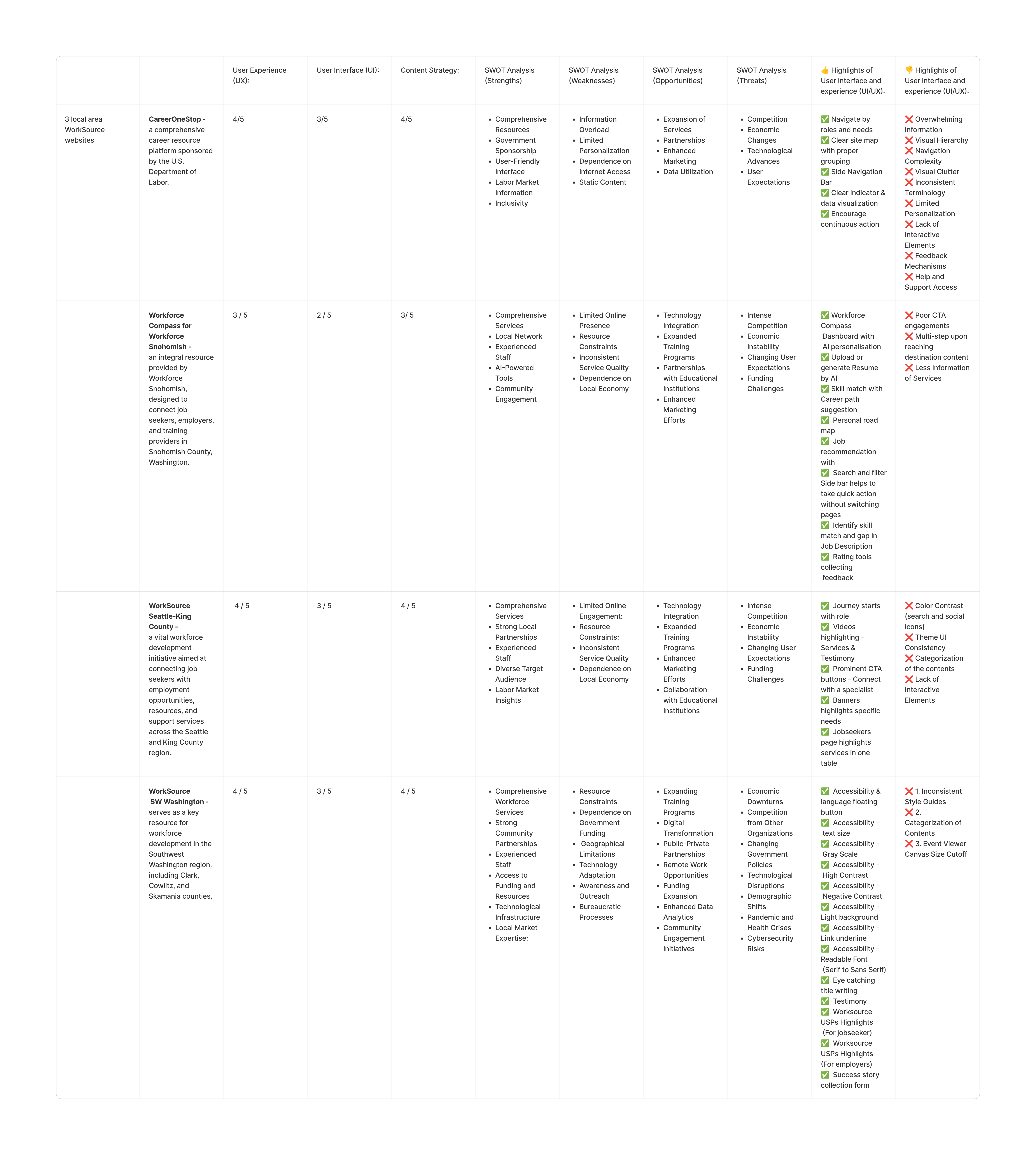
Competitive Analysis
How might we identify opportunities from competitors to strengthen WorkSourceWA’s position through competitive analysis?
As Lead UX Researcher, I conducted a comprehensive competitive analysis of workforce development platforms to identify strategic opportunities for WorkSourceWA.
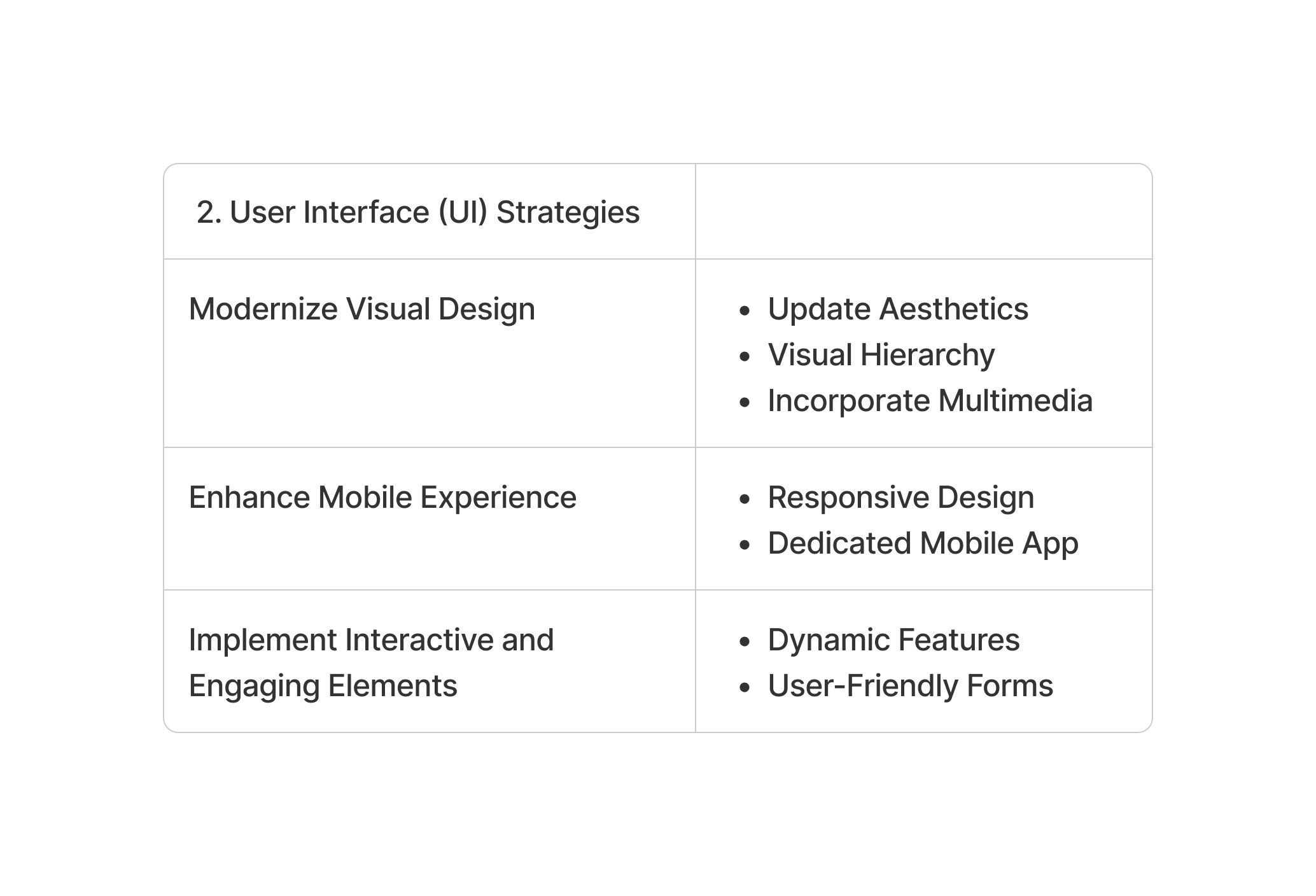
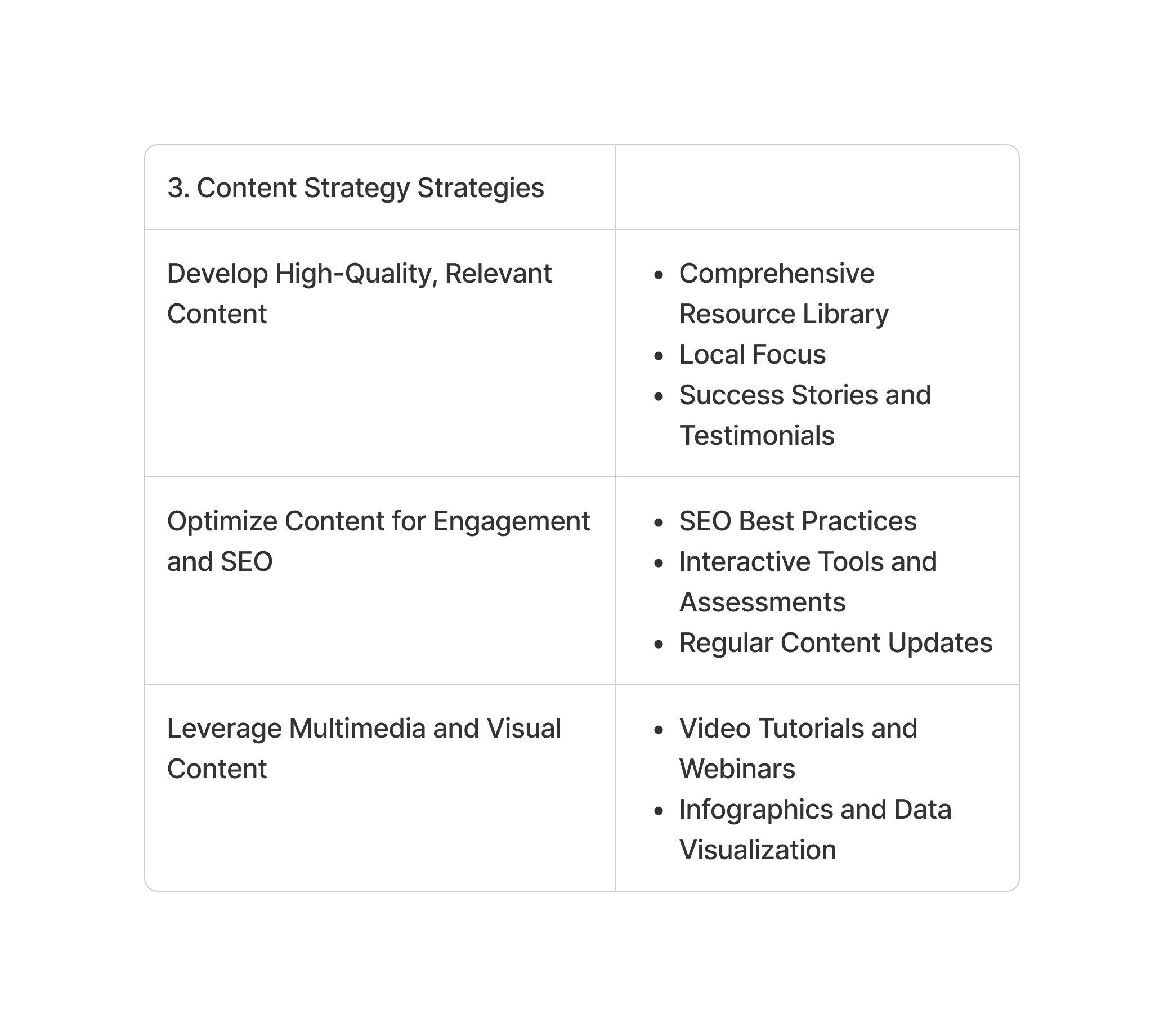
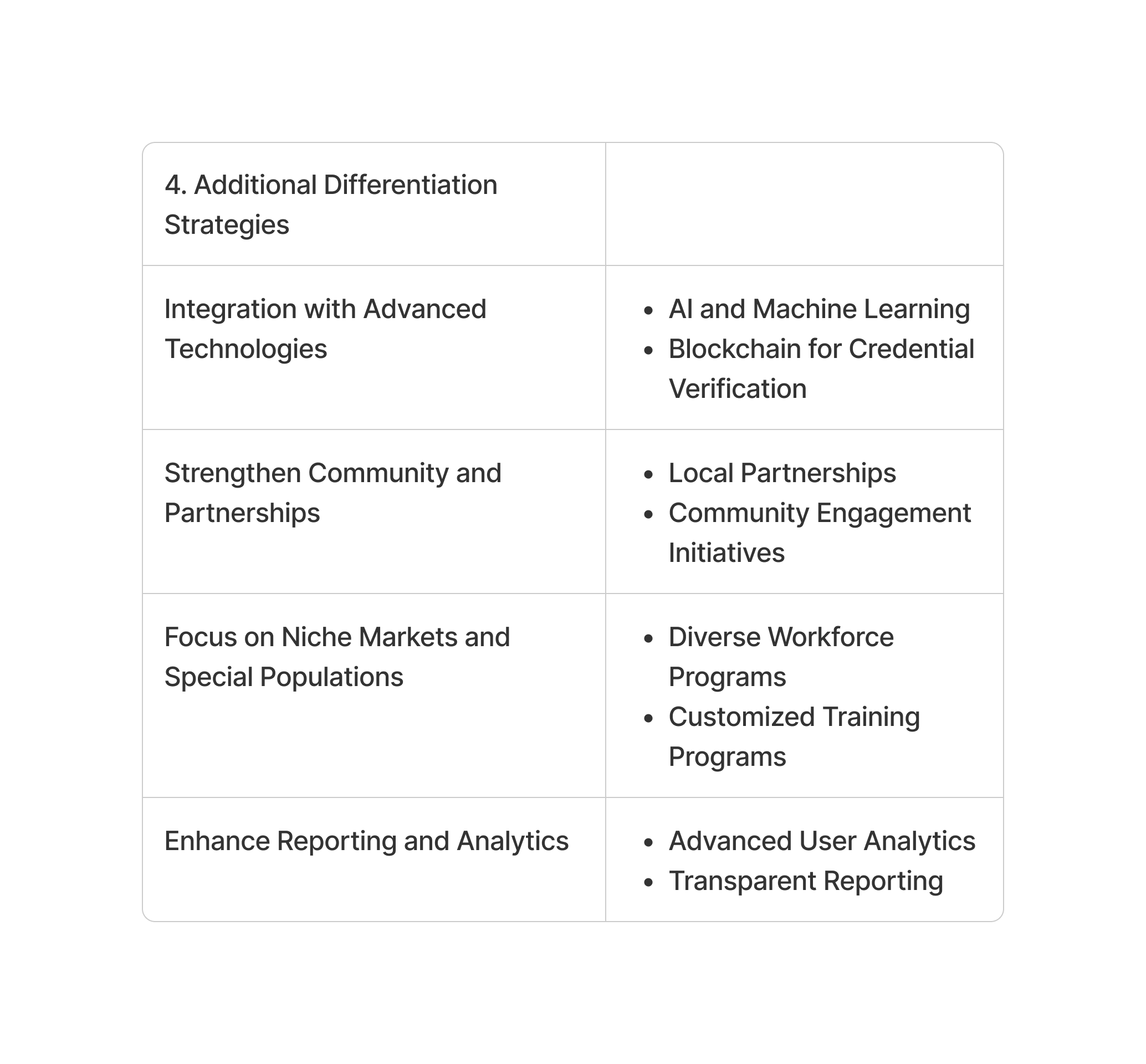
The goal was to evaluate competitor services, user experiences, and engagement strategies to uncover strengths, weaknesses, and market gaps. This research revealed clear opportunities for differentiation—such as improving usability, delivering personalized content, and enhancing support for both job seekers and employers.
These insights directly informed service improvements, content strategy, and outreach initiatives, helping WorkSourceWA better meet user needs and strengthen its market position across Washington State.
Define Goal:
The workforce website market in Washington is robust and multifaceted, focusing on bridging the gap between job seekers and employers while fostering economic development through targeted training and support services.
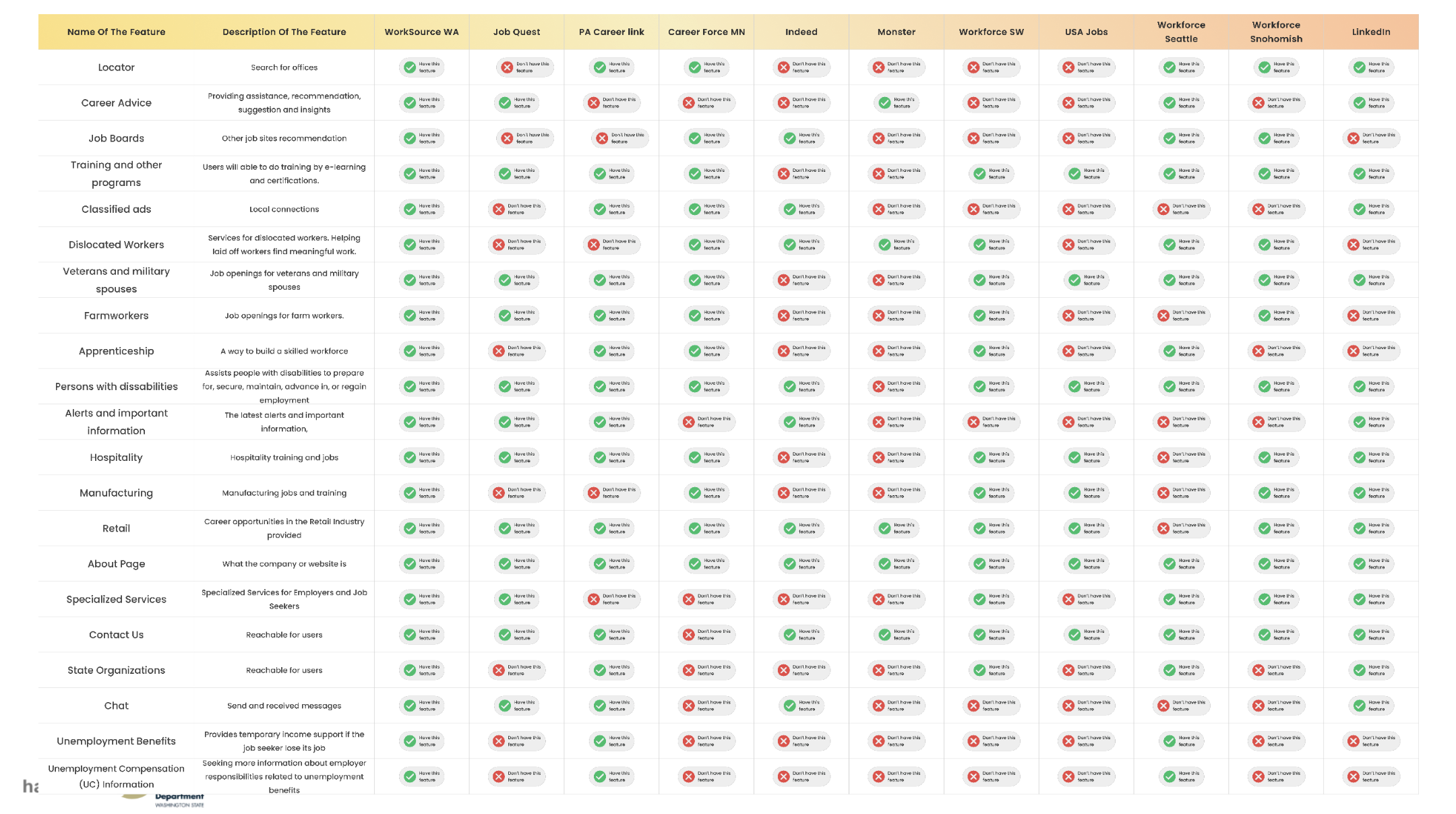
Feature comparsion:
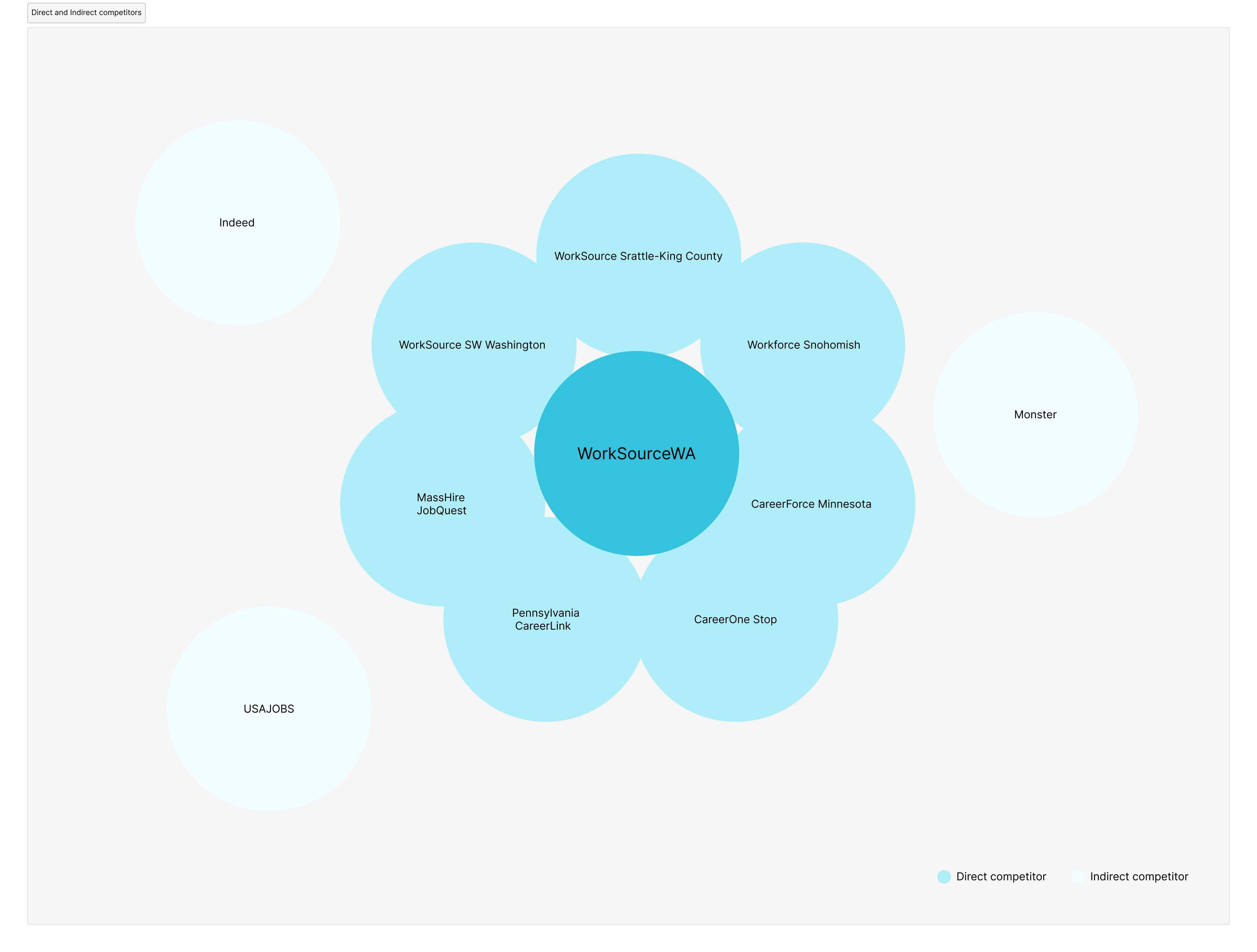
Direct and Indirect competitors:
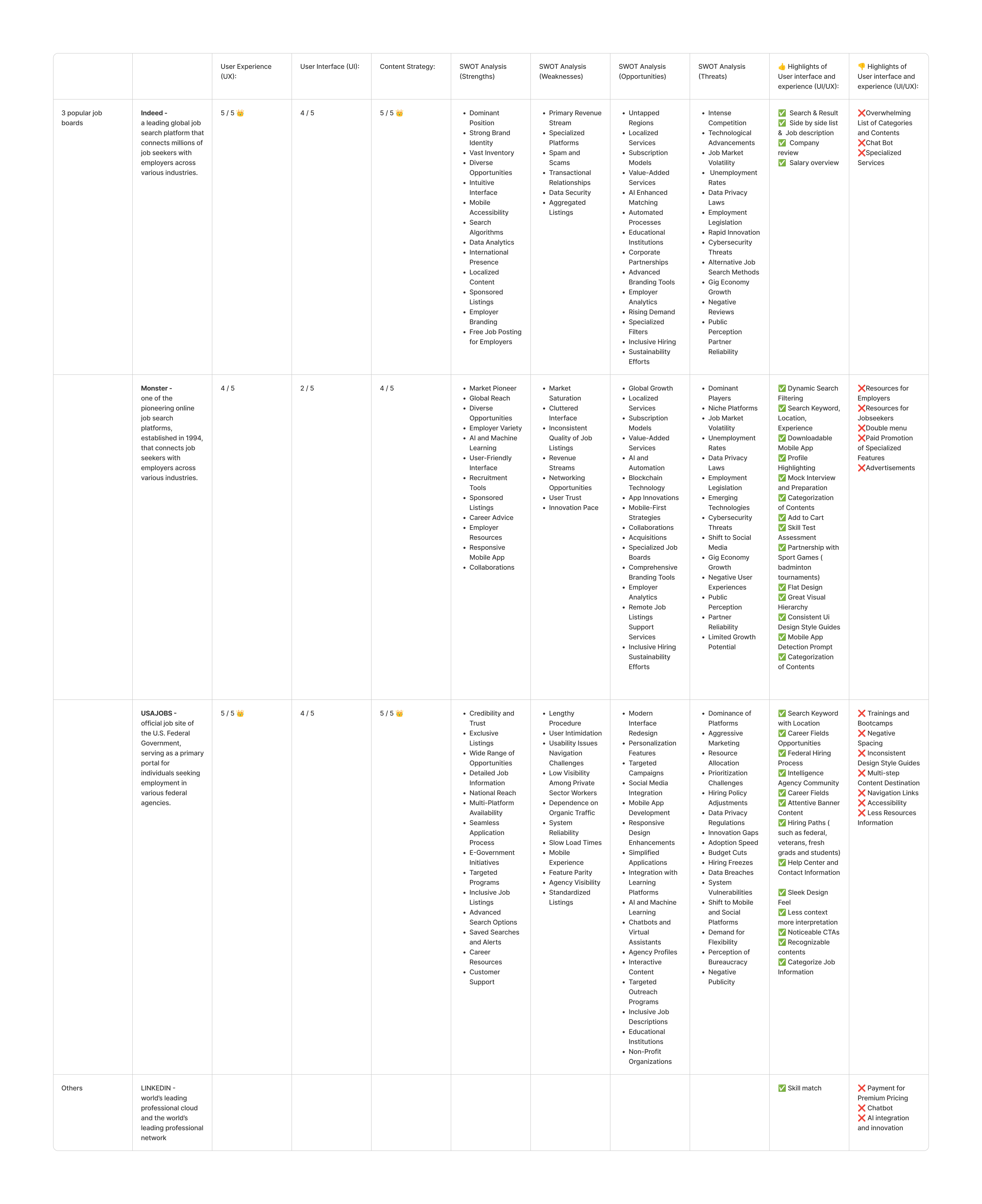
Overview:

Conclusion - How WorkSourceWA differentiate from competitors?


Week 3–4: Information Architecture Exploration
- Deliverables:
- Card Sorting Data Analysis – synthesized open and closed card sort results to identify mental models of users.
- Tree Test Analysis – validated user navigation expectations and identified areas of confusion.
- Leadership Highlight: Led the analysis of card sort and tree test data, extracting key user insights that informed IA decisions and aligned navigation structure with user expectations, accessibility standards, and state policy requirements.
Card Sorting Analysis
The goal of this research was to understand how users naturally group and categorize content on the WorkSourceWA platform. Specifically, the study aimed to explore:
- Whether users differentiate between authenticated (logged-in) and unauthenticated (public) content.
- How Spanish-speaking users organize and interpret WorkSourceWA content.
- How job seekers and employers sort shared or overlapping information relevant to both audiences.
Outcome:
The insights gained supported the ideation of meaningful category names and content groupings. This work directly contributed to enhancing site navigation, improving overall usability, and informing a more intuitive information architecture.
User Task:
Organize named items into categories that make sense to you and name each category.
Key Findings:
Methodology:
 Methodology:
1. Conducted Open Card
Facilitated open card sorting sessions to explore how users naturally group and label content.

2. Data Analysis:
Exploratory & Statistical Exploratory Analysis:
Identified patterns, themes, and user mental models based on qualitative input.
Statistical Analysis:
Applied quantitative methods to validate trends and measure consistency across participants.
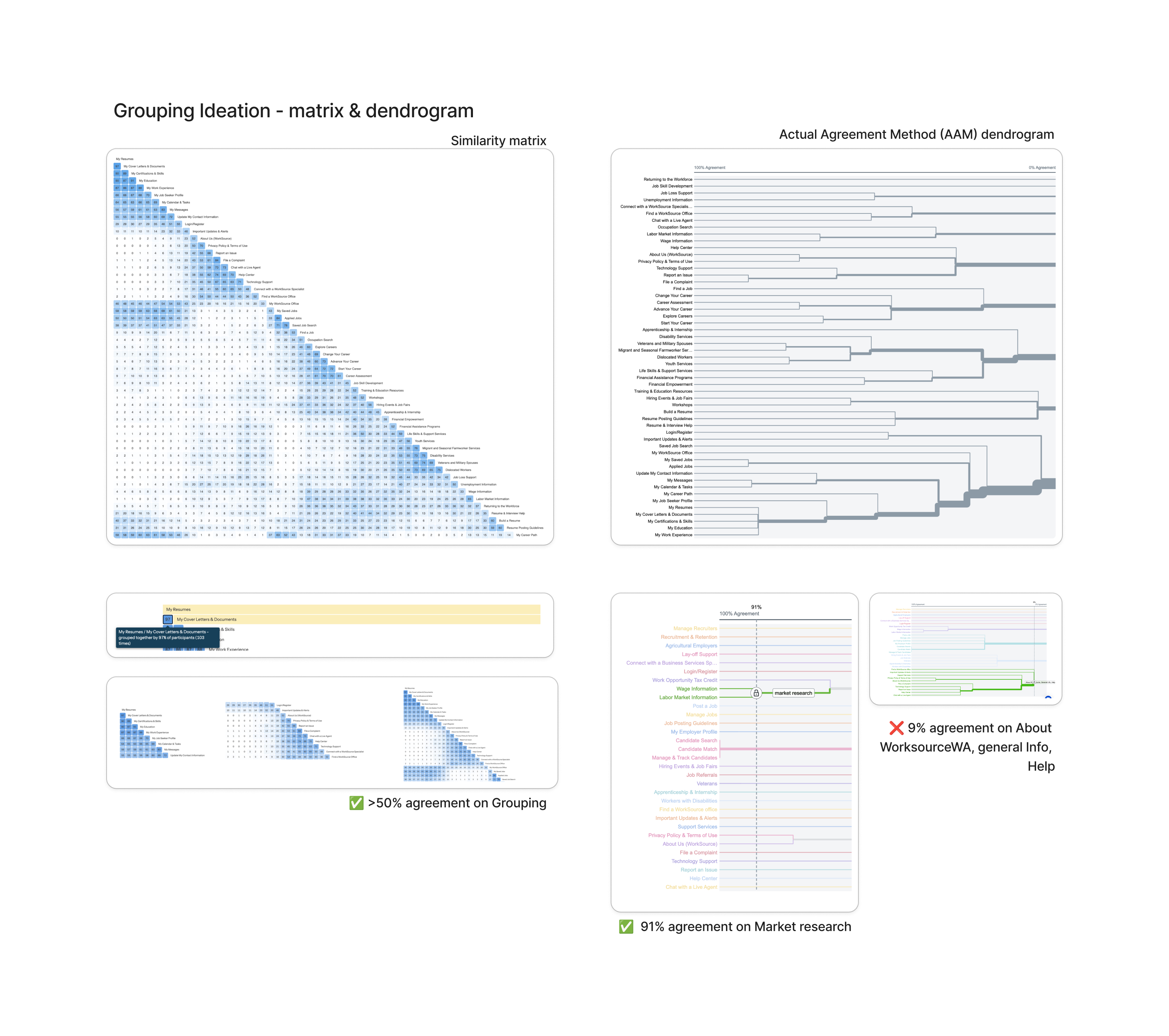
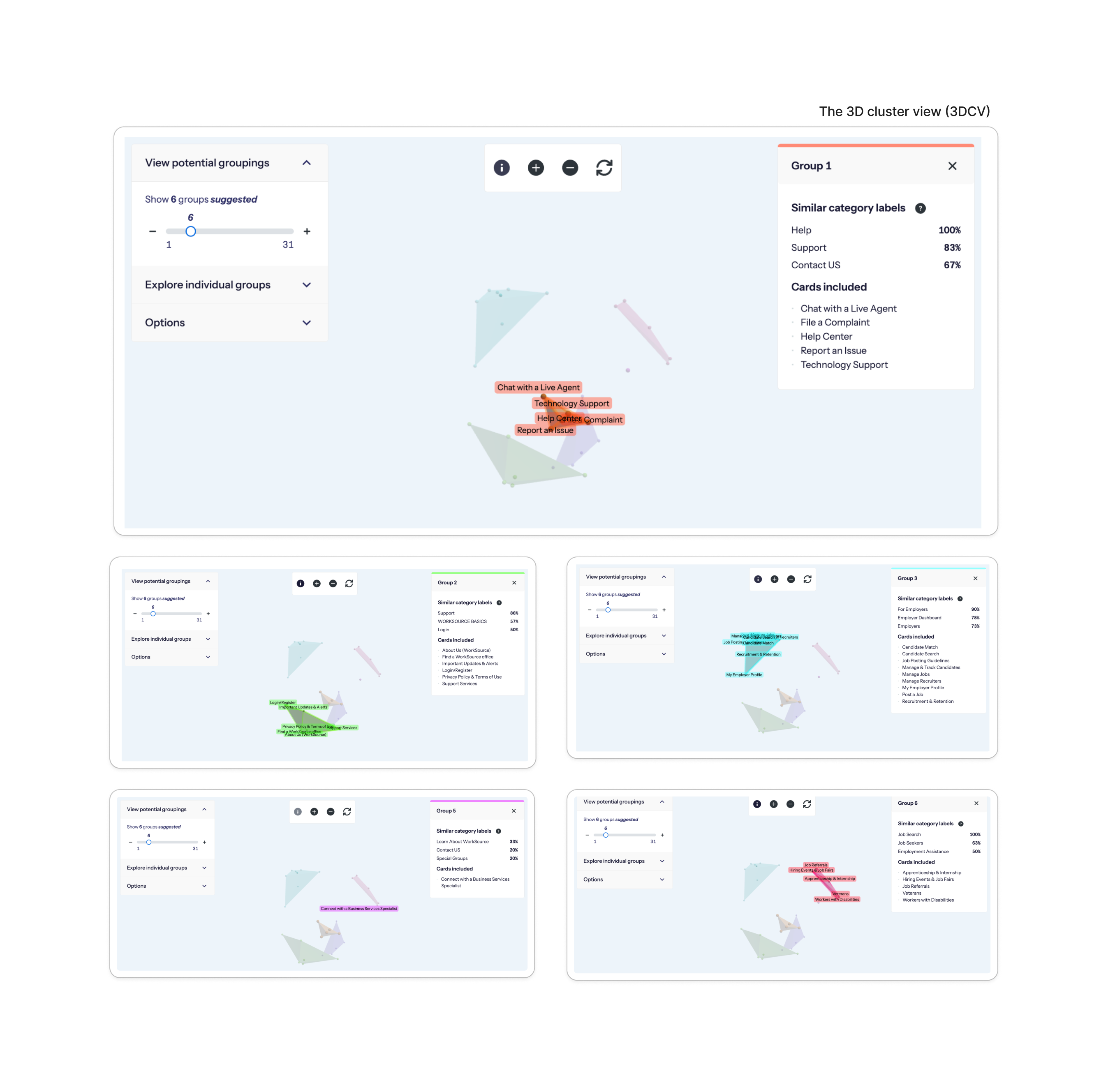
3. Draft IA vs. User Findings Comparison (150 records)
Evaluated alignment

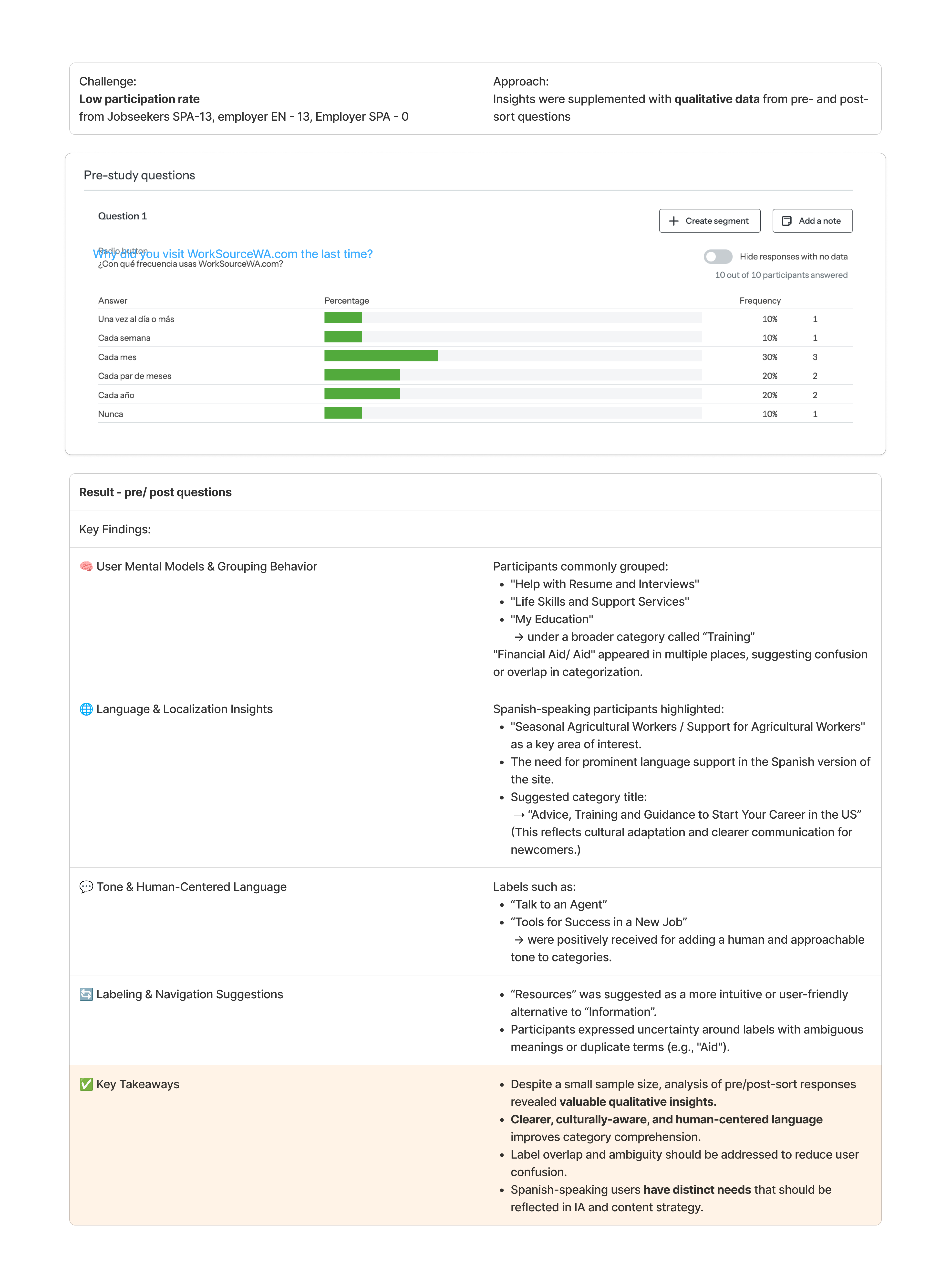
Challenge:
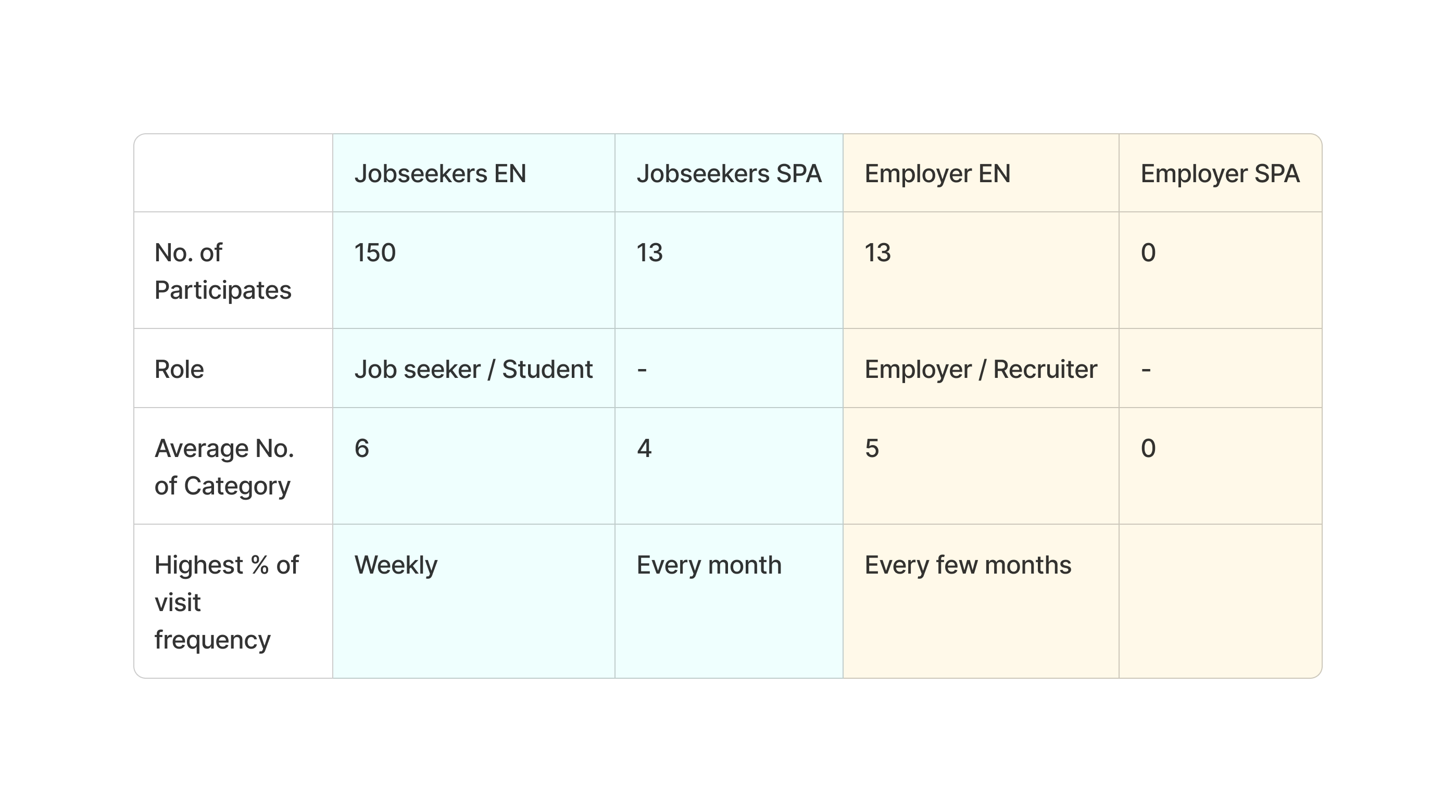
Low participation rate from Jobseekers SPA-13, employer EN -13, Employer SPA-0
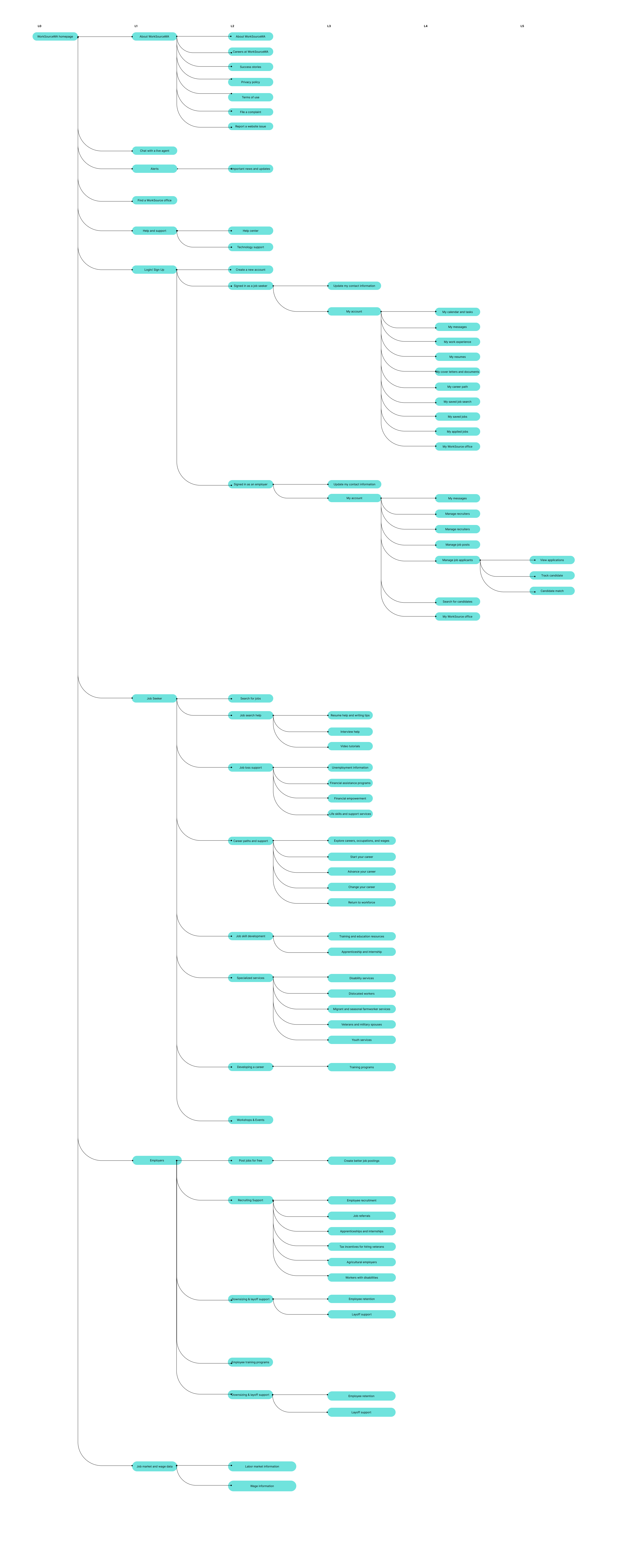
4. Proposed Revised Information Architecture
Developed a refined IA structure based on user insights, with improved categorization and navigation logic.
Tree Testing Analysis
The goal of this research was to evaluate the effectiveness of the revised Information Architecture (IA) in helping users easily navigate and find key content:
- IA Intuitiveness: Can users locate essential sections with ease?
- Content Findability: Are job listings, events, training resources, and office locators easy to find?
- Label Clarity & Engagement: Are labels clear and descriptive enough to support sign-ups and engagement?
Outcome:
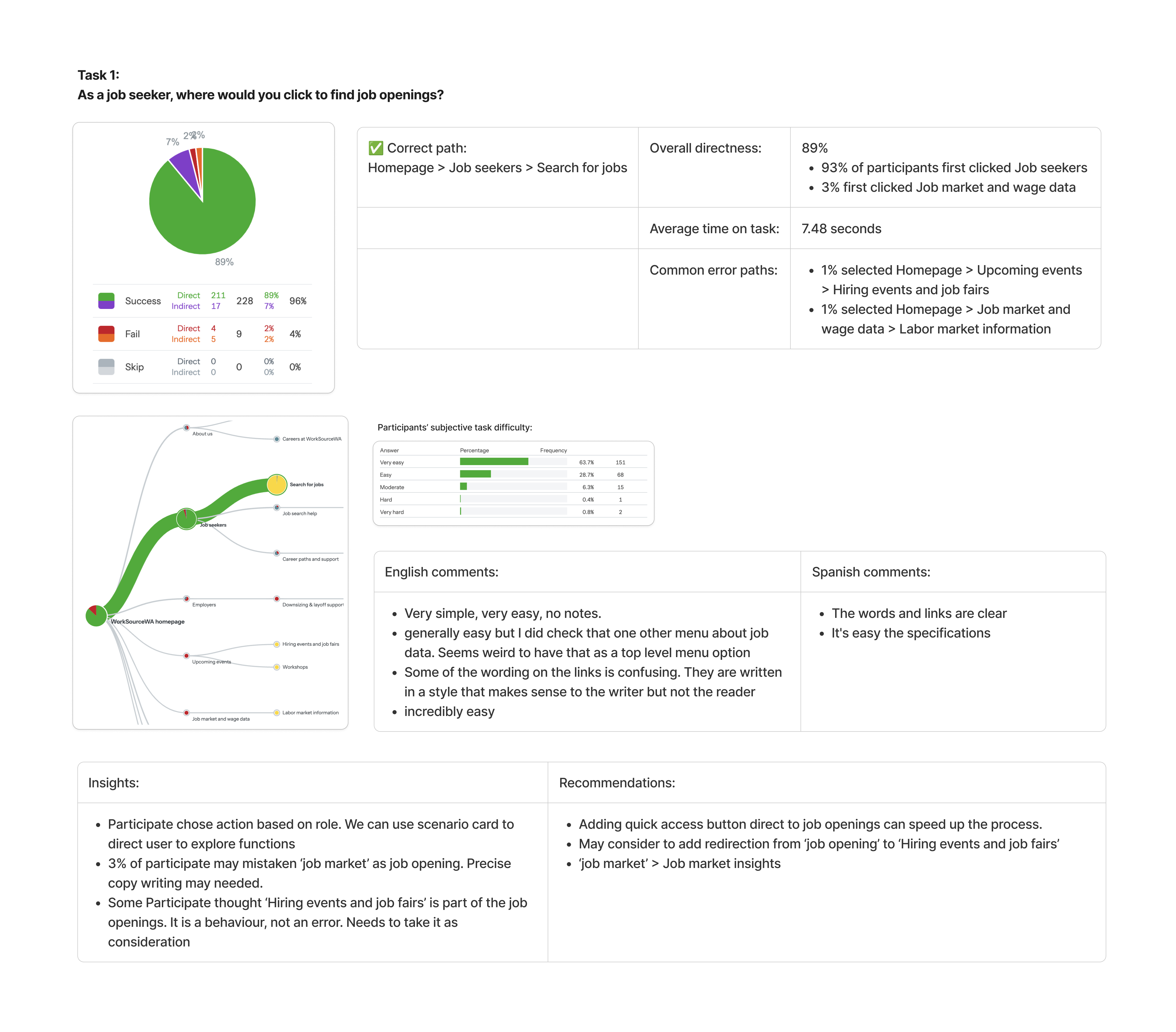
Unmoderated tree testing evaluated the draft WorkSourceWA IA, aiming to improve content findability and support account sign-ups, aligning with goals to enhance user experience and engagement.
Key Findings:
Methodology:

- Tested draft IA based on preliminary card sort results for English speaking job seekers and employers, using Optimal Workshop, an unmoderated online tree testing tool
- Participants were asked to complete 10 of 16 randomized tasks using a simplified, text-only version of the site’s navigation (without design elements like menus or buttons).
- Participants had the option to provide comments about each task.
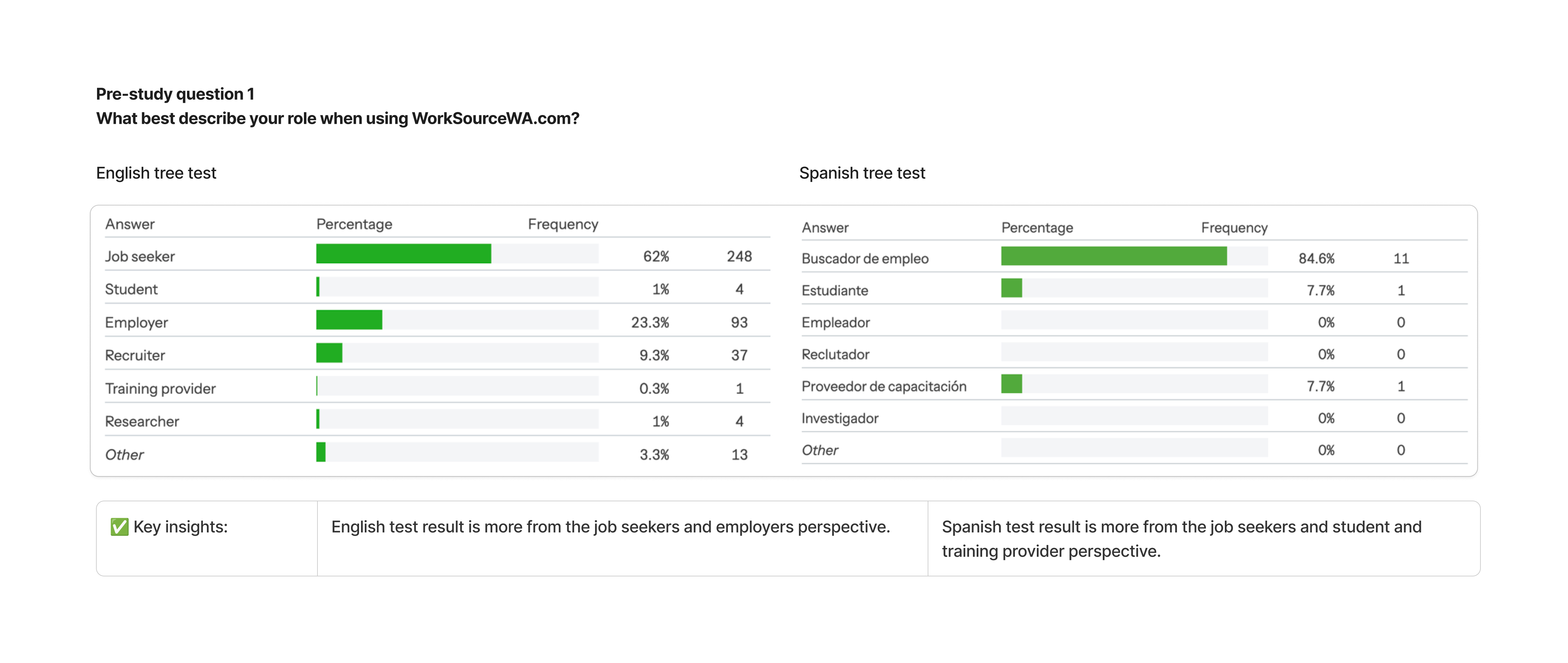
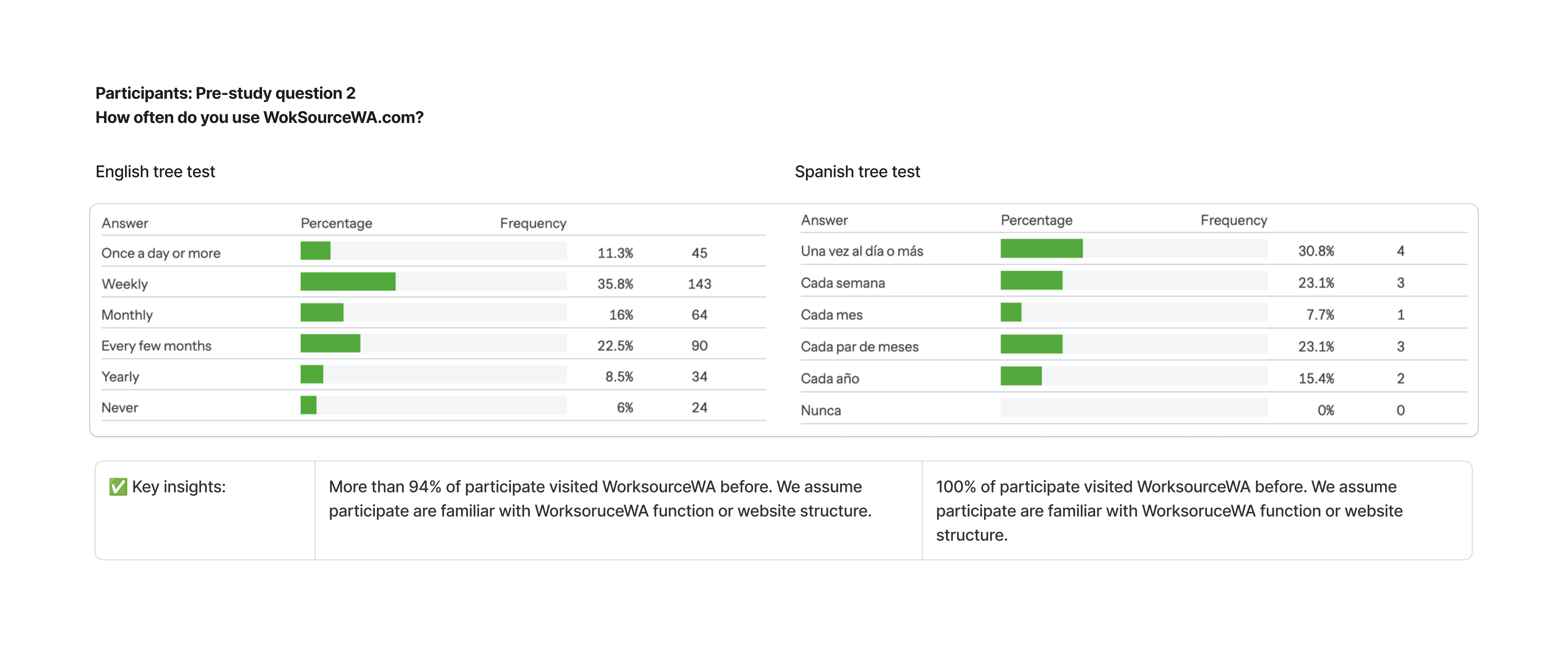
- Pre- and post-study questions were asked.
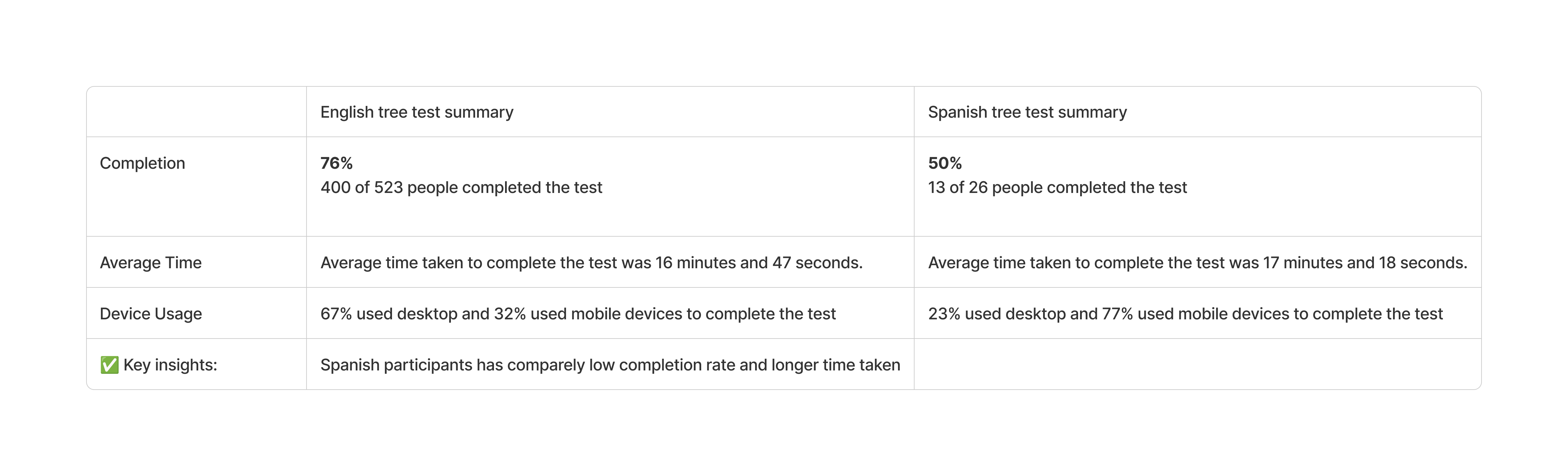
- Both English and Spanish versions of the test were launched on Sep 27, 2024 and closed Oct 5, 2024 (about 1 week)
User Task:
Complete the assigned goals by following the IA.
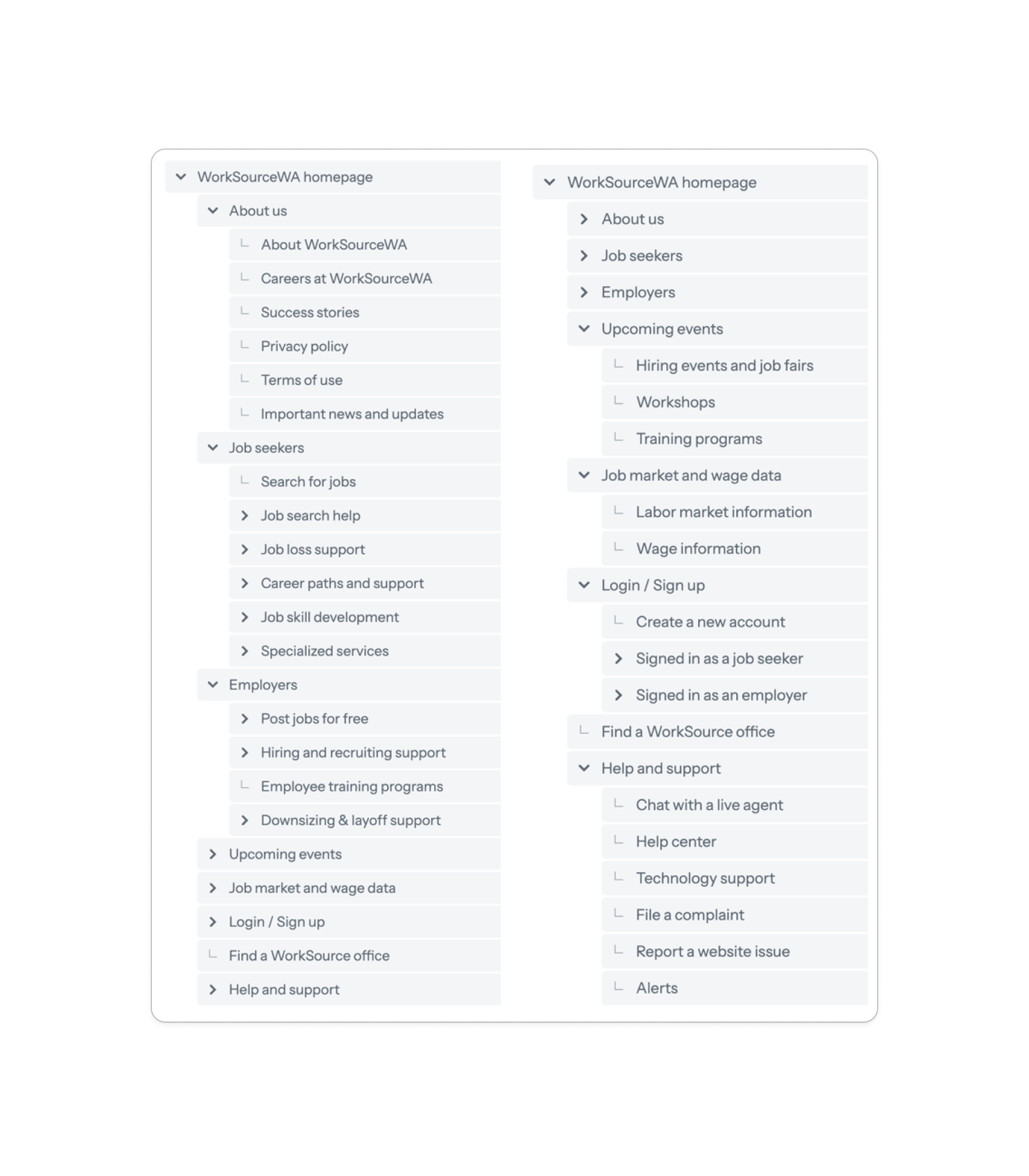
Findings & Analysis: (Total 16 taks)
Overview:
1. Participants
2. Pre-study questions
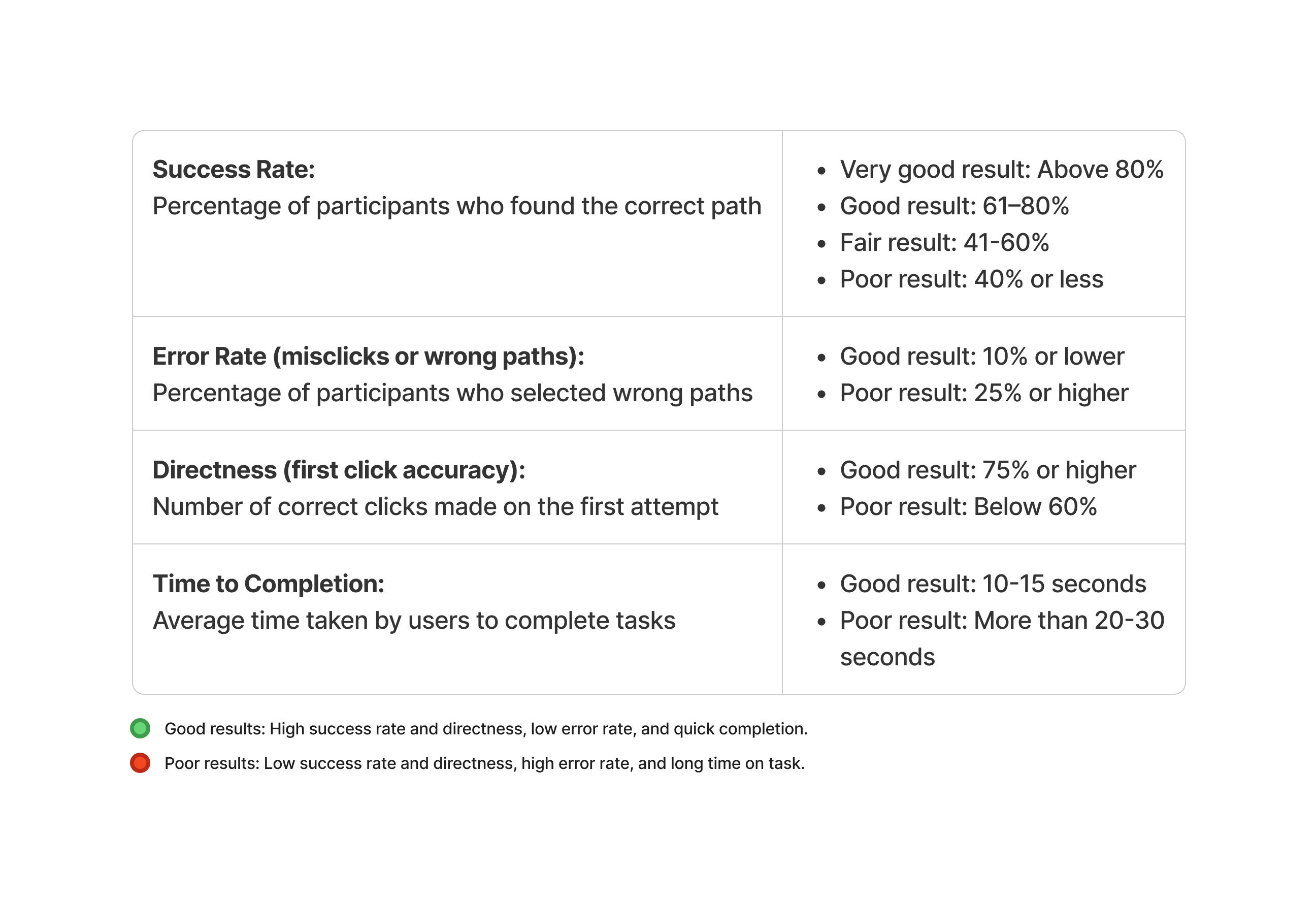
3. Key metrics

Week 5–6: Content & IA Design
- Deliverables:
- Information Architecture & Taxonomy – reorganized content for clearer pathways and relevance.
- Content Governance Plan – established scalable workflows, content roles, and editorial standards.
- Leadership Highlight: Defined tagging and labeling systems to support future sitemap, CMS integration and search optimization.
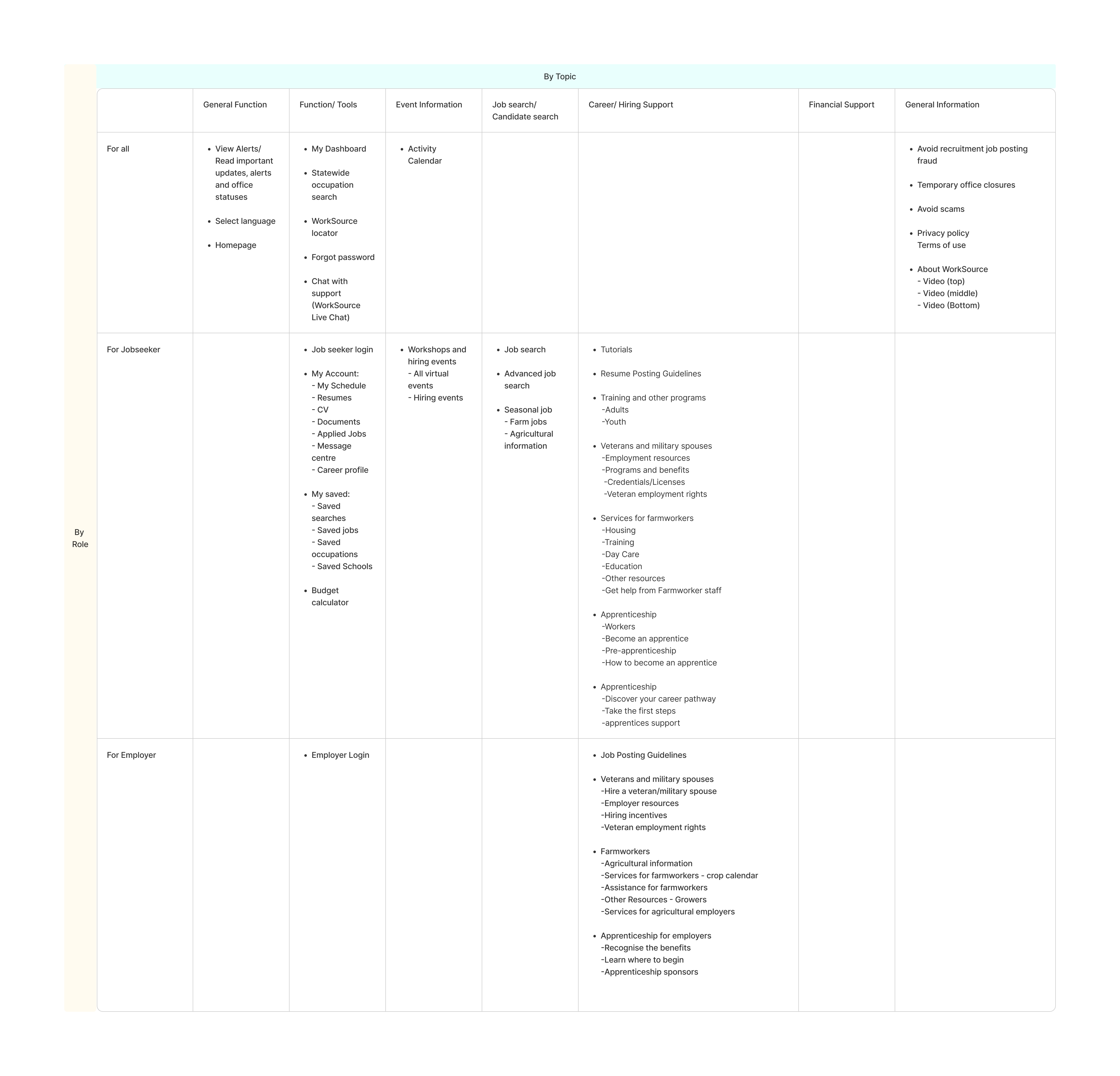
First draft of Taxonomy Design
To improve content discoverability and relevance, I designed the initial taxonomy to categorize content in two key ways:
-
By Topic – Organizing content by topics such as job searching, employer resources, training programs, and career advice helps users easily navigate and find information based on their specific interests or needs.
-
By Role – Classifying content based on user roles—jobseekers, employers, and administrators—ensures that each audience group receives tailored content aligned with their goals and context.
Additionally, when displaying related content, we can reference items within the same taxonomy row to surface more relevant and connected information.
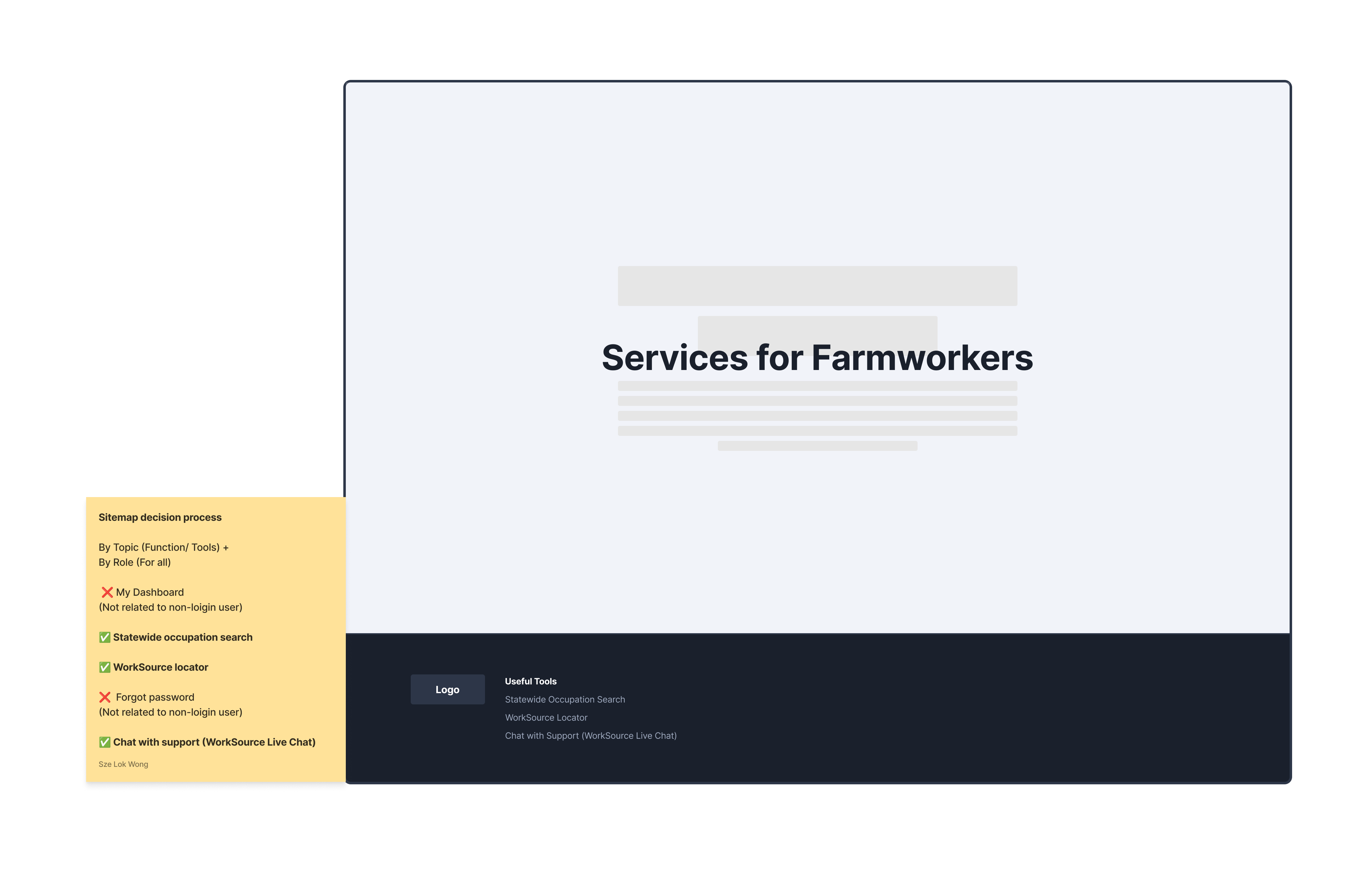
How do I adapt Taxonomy Design to the site map?
Support Cross-Linking with Tags or Metadata
Use taxonomy tags to connect content across different sections in the site map. This helps show related content or power smart search and filters.
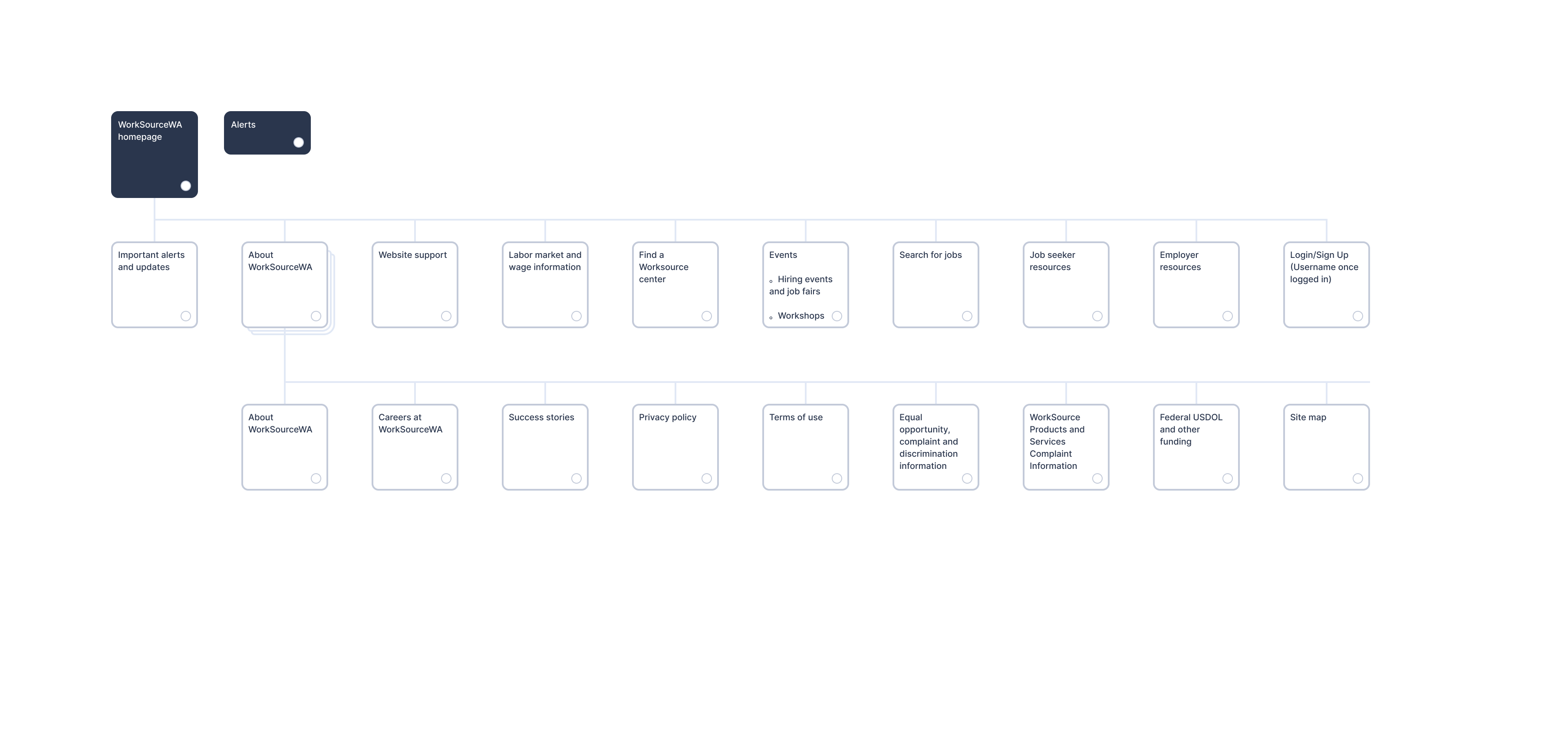
Sitemap example
Week 7–10: Testing & Iteration
- Deliverables:
- Usability Testing Report – conducted moderated tests on prototypes to validate IA and content clarity.
- Leadership Highlight: Aligned findings with policy and technical constraints.
Methodology:
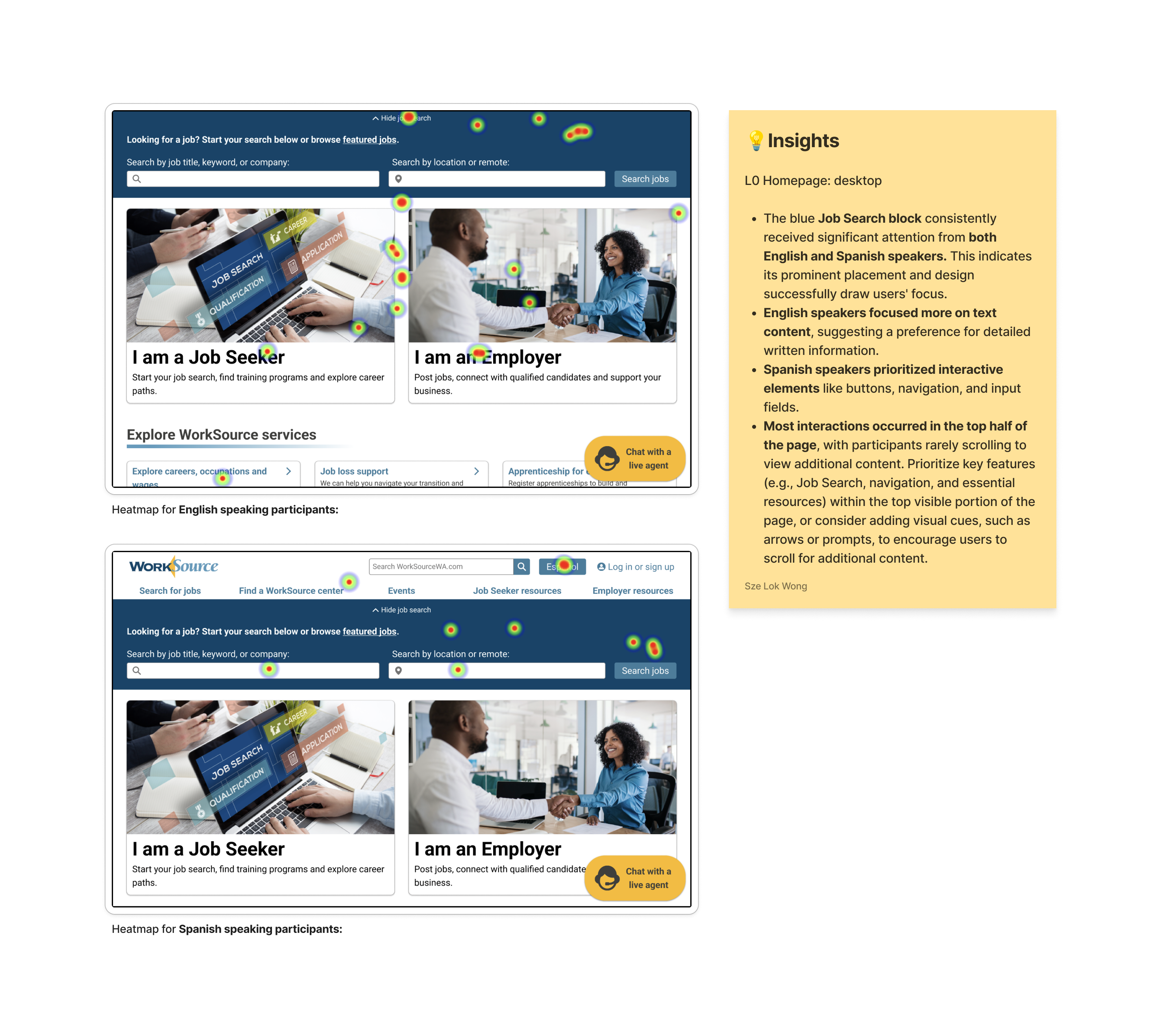
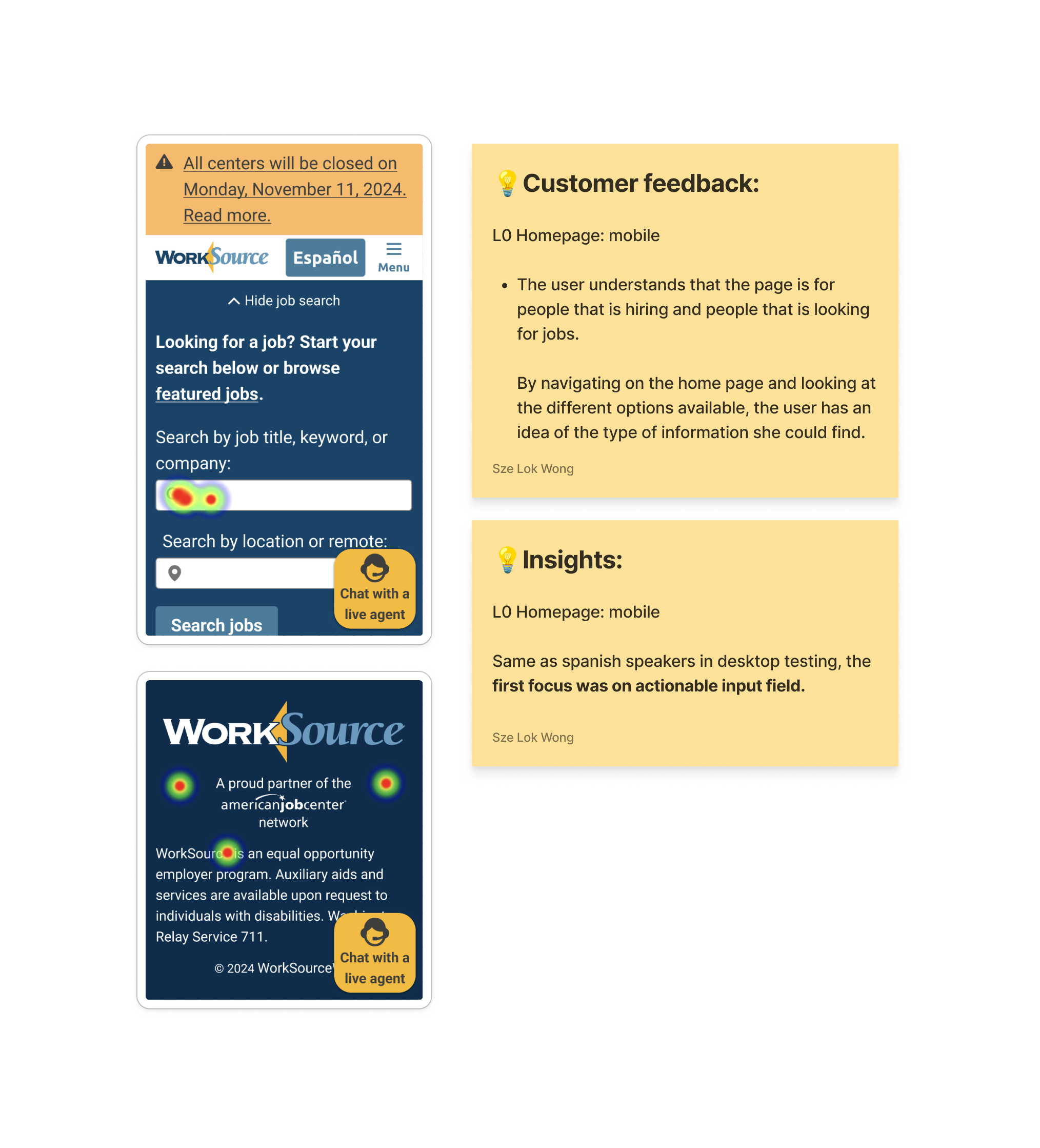
- Tested draft revised layout for job seekers & employers (English & Spanish) , using Figma prototype, and a heatmap to assist the user interview.
User Task:
- Complete the assigned tasks, evaluate their level of difficulty, and share insights about your experience — including opinions, challenges, and any points of frustration.
Overview:![]()
Heatmap - Findings & Analysis:

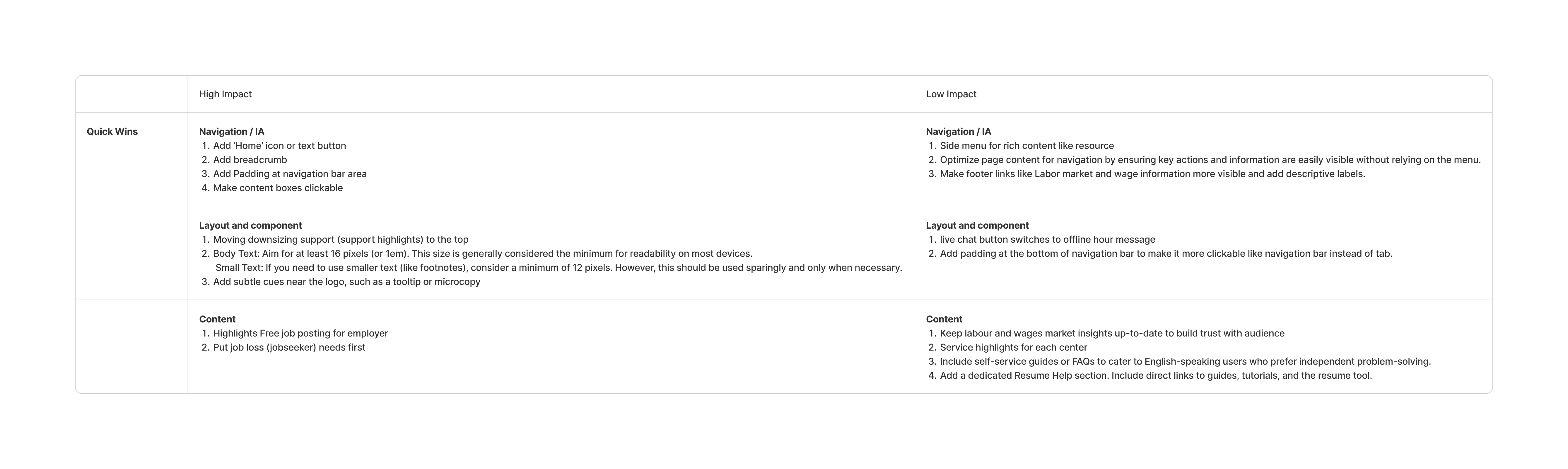
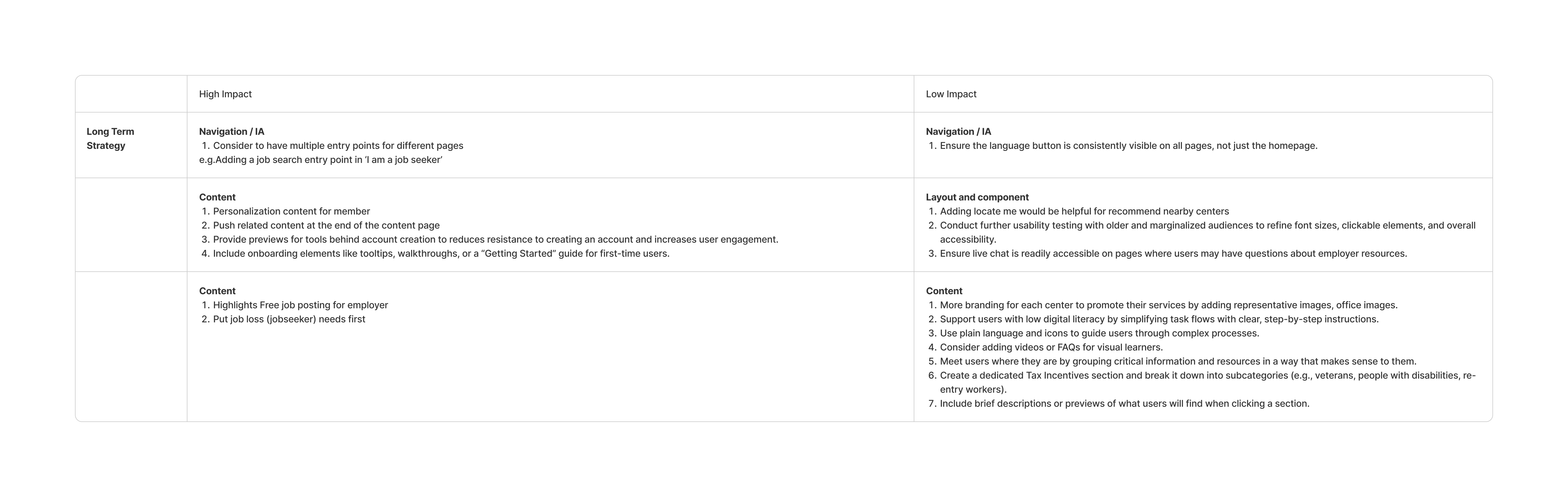
Recommendations:
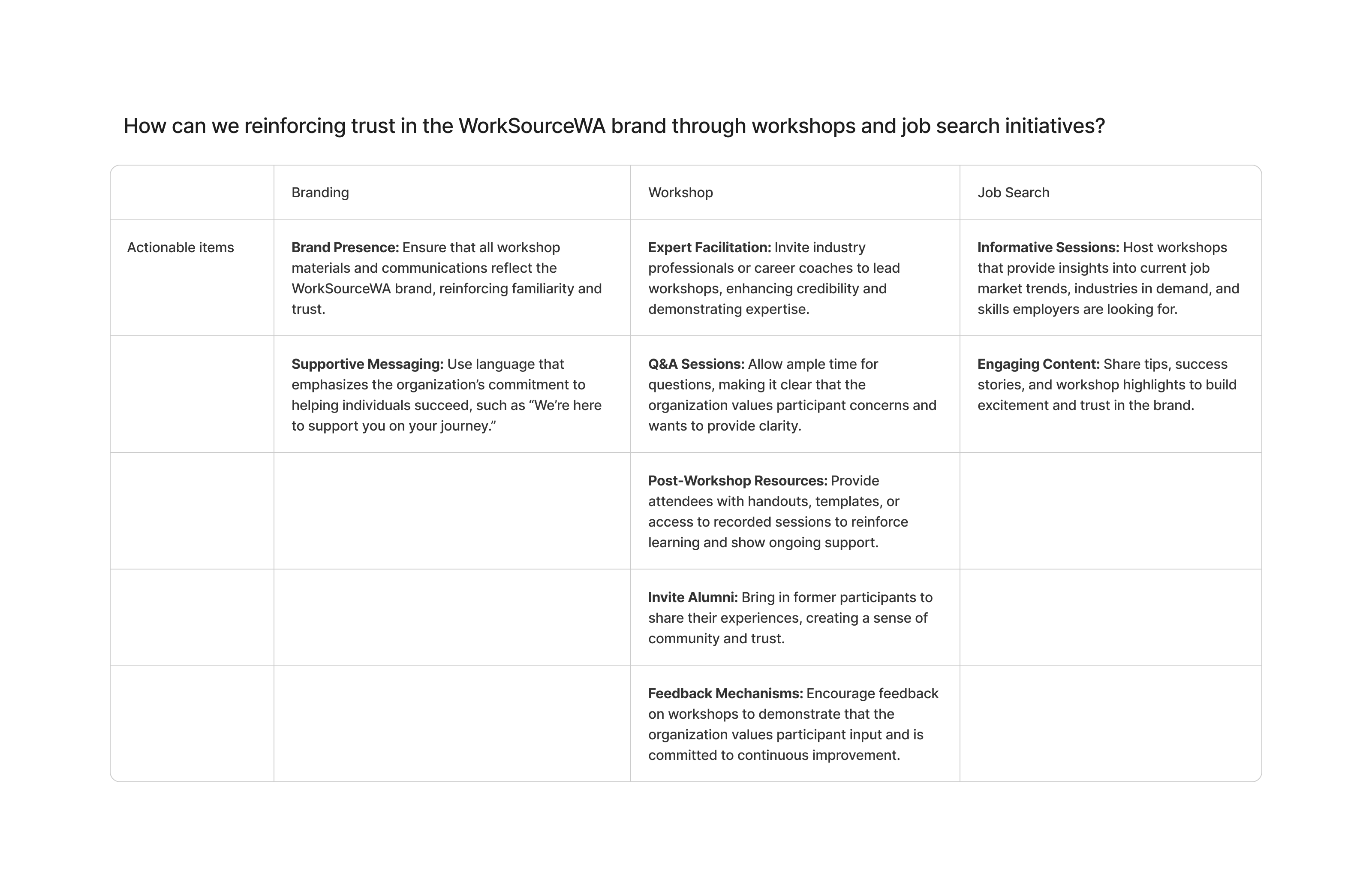
Conclusion:
Inspirational quote from our WorkSource customer:
“I went to work Source recently because I wanted something simple that was not going to manipulate me. I know that every job, I hope this is true, I hope every job in Washington state is posted on this website and I hope that the jobs are real. And I know they're just a time- stamped ads, but I know that a real company posted it three weeks ago. So I can go to the company website and they're not trying to get me to click here and there to sort of manipulate their own numbers, but actually, these are good people here providing me genuine value. So yeah, I think you're on the right track and I think you've got a good thing going.” - EngJ2